
Inside the box: the parts of a computer
Meet the five parts every computer has, from a laptop to a phone, and follow one key press from your finger to a letter on the screen.
FIVE JOBS
Every computer does the same five jobs
Input brings things in: keyboard, touch screen, microphone, camera. The processor (CPU) carries out instructions, one after another, very fast. Memory (RAM) is short-term working space for whatever is running right now. Storage (an SSD or hard disk) keeps files and apps for the long term. Output sends results back out: the screen, the speaker. Only the processor actually does anything; every other part feeds it or keeps things for it.
Your phone: the touch screen and mic are input, one chip holds the processor, there is RAM for running apps, 128 GB or so of storage for photos, and the screen and speaker are output.
Check yourself
Which part of a computer actually carries out a program's instructions?
- The RAM
- The SSD
- The processor (CPU)
- The screen
Show the answer
The processor (CPU)
Right. The processor is the only part that carries out instructions. RAM and the SSD hold things for it, and the screen shows what it produced.
Memory and storage are not the same thing
Memory (RAM)
Fast working space for what is running right now: the open apps, the page you're reading, the game level you're on. Usually a few gigabytes. Wiped when the power goes off.
Storage (SSD or hard disk)
Slower, much bigger space for everything you keep: photos, apps, documents. Often hundreds of gigabytes or more. Keeps everything with the power off.
A desk and a filing cabinet
Storage is the filing cabinet: it holds everything you own, but getting a folder out takes a moment. RAM is the desk: small, but whatever is on it is right under your hands. To work on something you take it out of the cabinet and spread it on the desk. At the end of the day the desk is cleared, and only what you put back in the cabinet is still there tomorrow. Where the analogy breaks: a computer's "desk" is cleared the instant the power goes off, not at a time you choose.
Check yourself
Sara's phone lists "8 GB RAM, 128 GB storage". She switches it off overnight. Where are her photos in the morning?
- In the 8 GB of RAM
- In the 128 GB of storage
- Split between the two
- Nowhere; she needs to download them again
Show the answer
In the 128 GB of storage
Right. Storage keeps its contents with the power off, so the photos wait there. The RAM was wiped the moment the phone switched off.
Step through it
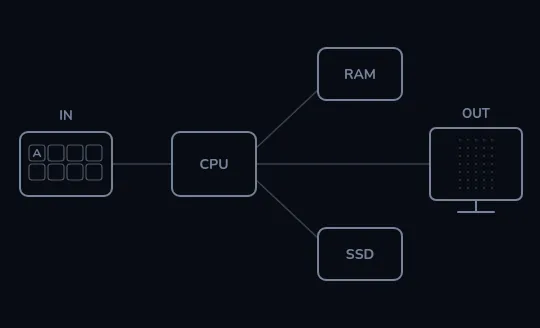
Five parts, all waiting The five parts of every computer: input (IN, here a keyboard), the processor (CPU), memory (RAM), storage (SSD) and output (OUT, here a screen). Thin lines show how they connect. Nothing has been pressed yet, so everything is dim.
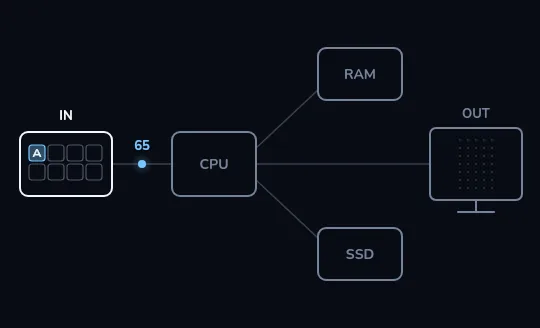
Pressing A sends a number You press the A key. What travels toward the processor is not a letter but a number. Here it is shown as 65, the standard code for a capital A; the keyboard's own key number is different, and software translates it along the way.
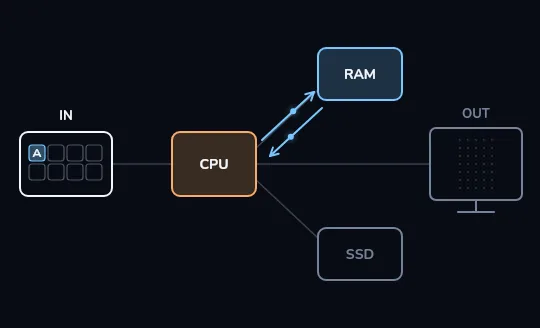
The processor works, using RAM The processor and memory light up and small dots shuttle between them: the running app's instructions execute on the CPU, which uses RAM as scratch space. The SSD stays dim, because nothing needs to be opened or saved to show one letter.
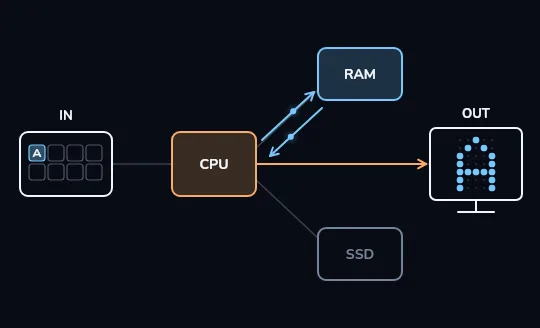
The letter A appears An orange arrow runs from the processor to the screen, carrying which tiny dots of light (pixels) to change. The screen lights them and an A made of dots appears. From key to letter, the whole trip took a small fraction of a second.
Check yourself
To show the letter A after you press the key, the computer has to read something from the SSD.
Show the answer
False
False. The app is already running, so its instructions and working data are in RAM, and the CPU does the rest. Storage matters when you open or save something, not for each key press.
THE BIG IDEA
Programs are just numbers in memory
Inside a computer, everything is stored as numbers: letters, colours, sounds, and also the program's own instructions. The stored-program idea, usually credited to computer designs of the 1940s described by John von Neumann and others, is that instructions and the data they work on sit in the same memory. So a computer doesn't need rewiring to do a new job. It just loads a different set of instructions.
Your phone is a calculator one second and a music player the next. Nothing inside changed shape; it loaded the music app's instructions into RAM and the processor started following those instead.
Check yourself
Omid's laptop runs a calculator, then he closes it and opens a music player. Why can the same machine do both jobs?
- It has a separate processor built for each kind of app
- Programs are instructions stored in memory as numbers, so it just loads different ones
- The music player is stored in RAM permanently, even with the power off
- The screen decides which job the computer is doing
Show the answer
Programs are instructions stored in memory as numbers, so it just loads different ones
Right. Both apps are just instructions stored as numbers. Loading a different set into memory is all it takes for the processor to do a different job.
Check yourself
Match each piece of hardware to the job it does
Show the answer
- Keyboard → Input
- CPU → Processing
- RAM → Short-term working memory
- SSD → Long-term storage
- Speaker → Output
Lesson recap
- Every computer, from a phone to a laptop, has five parts: input, processor (CPU), memory (RAM), storage and output.
- Only the CPU carries out instructions; the other parts feed it or keep things for it.
- RAM is fast working space that is wiped at power-off; storage is bigger, slower and keeps everything.
- A key press travels as a number to the CPU, which works with RAM and tells the screen which pixels to light.
- Programs are instructions stored as numbers in memory, so one machine can do many jobs by loading different ones.