
The CPU: registers, the ALU and the clock
Look inside the processor: tiny super-fast registers, an arithmetic unit made of gates, a control unit that directs them, and a clock that ticks billions of times a second.
THREE PARTS
What's inside a processor
The ALU (arithmetic logic unit) is the calculator: the adders and comparators from the last lesson. The registers are a handful of tiny storage slots right next to the ALU, each holding one number. The control unit reads each instruction and tells the others what to do: which registers to use, which operation to set the ALU to, where the answer goes.
For "add 7 and 5", the control unit sends the two register values into the ALU, sets it to add, and routes the 12 that comes out into another register.
A tiny, very fast kitchen
The control unit is the head cook reading the recipe one line at a time. The ALU is the stove where things actually get cooked. The registers are the three or four bowls right on the counter: the only ingredients the cook can reach without walking away. The fridge across the room is RAM. Where the analogy breaks: this cook never improvises, and follows each line of the recipe billions of times faster than any person.
Check yourself
Which part of the CPU actually adds two numbers together?
- The control unit
- The ALU
- A register
- The clock
Show the answer
The ALU
Right. The ALU, the arithmetic logic unit, is built from adders and other gate circuits. It does the actual calculating.
Register
A tiny storage slot inside the processor, right next to the ALU, holding one number. Registers are the fastest storage in the whole computer, but there are very few of them: an x86-64 processor has 16 general-purpose registers and an ARM64 one has 31, each 64 bits wide. The ALU calculates on values held in registers, so data has to be brought in from memory first.
In our toy processor, R1 holds 7 and R2 holds 5. To add them, both must already be sitting in registers.
Check yourself
In our toy processor, where must two numbers be before the ALU can add them?
- In registers
- On the SSD
- Anywhere in RAM; the ALU reads it directly
- In the clock
Show the answer
In registers
Right. The ALU works on values in registers, the tiny slots right next to it. Numbers in RAM have to be loaded into registers first.
Step through it
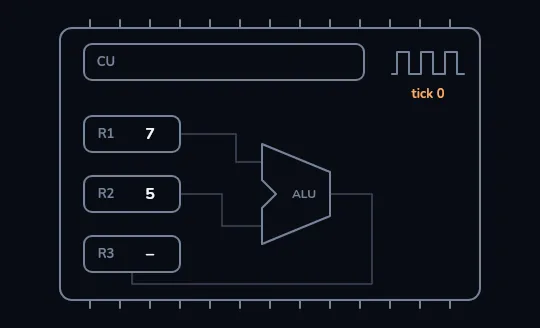
Inside the toy processor The chip outline holds three registers on the left, R1 = 7, R2 = 5 and an empty R3, the V-shaped ALU in the middle, the control unit (CU) on top and a small clock reading tick 0. Nothing is moving yet.
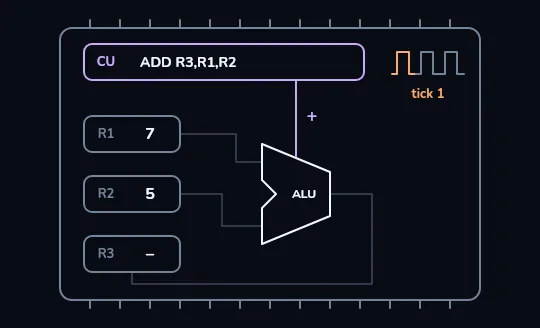
The control unit sets up an add The clock ticks to 1. The control unit shows the instruction ADD R3,R1,R2, meaning add R1 and R2 and put the answer in R3, and a control line to the ALU lights up with a plus sign: the ALU is now set to add.
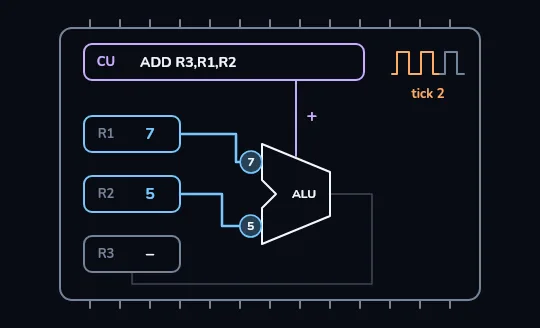
7 and 5 flow into the ALU On tick 2, two dots labelled 7 and 5 travel out of R1 and R2 and into the ALU. The registers keep their own copies; the values are sent, not moved out.
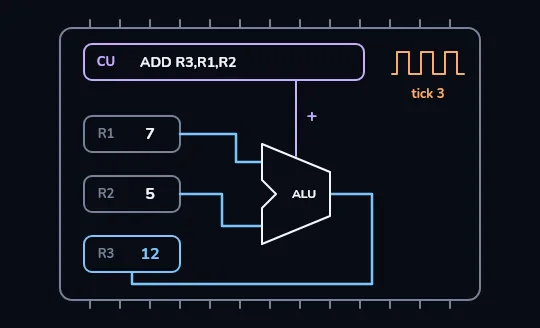
12 lands in R3 On tick 3 the wire from the ALU to R3 lights up and the answer lands there: R3 now reads 12. On a 3 GHz chip, three ticks take about one billionth of a second.
Check yourself
Same toy processor, new numbers: R1 = 9 and R2 = 4. After ADD R3,R1,R2 runs, what do the three registers hold?
- R1 = 9, R2 = 4, R3 = 13
- R1 = 0, R2 = 0, R3 = 13
- R1 = 13, R2 = 4, R3 = –
- R1 = 9, R2 = 4, R3 = 94
Show the answer
R1 = 9, R2 = 4, R3 = 13
Right. The ALU adds 9 and 4 and writes 13 into R3. R1 and R2 only sent copies of their values, so they still hold 9 and 4.
THE CLOCK
Billions of ticks a second
The clock is a signal that switches on and off at a steady rate, and each step the processor takes is lined up with its ticks. Clock speed is measured in hertz, ticks per second. 3 GHz means 3 billion ticks every second, so one tick lasts about a third of a nanosecond.
In a third of a nanosecond, light itself travels only about 10 cm. A 3 GHz processor has already moved on to its next tick before light could cross your hand.
Check yourself
A laptop's processor is listed as 3 GHz. How many times does its clock tick each second?
- 3 thousand
- 3 million
- 3 billion
- 3 trillion
Show the answer
3 billion
Right. Giga means billion, so 3 GHz is 3 billion ticks per second, about a third of a nanosecond each.
CORES AND 64-BIT
Two numbers on every spec sheet
A core is one complete processor: its own registers, ALU and control unit. A "6-core" chip is six of them on one piece of silicon, able to run six things truly at the same time. 64-bit means the registers and the ALU handle 64-bit numbers in one go, values up to about 18 quintillion.
A phone chip might list "8 cores, 64-bit": eight processors side by side, each working on 64-bit numbers.
Check yourself
Between two processors, the one with the higher GHz number is always the faster one.
Show the answer
False
False. GHz only tells you how often the clock ticks. Work done per tick, the number of cores, cache size and design all matter too, so a newer 3 GHz chip can beat an older 4 GHz one.
Lesson recap
- A CPU has an ALU that calculates, registers that hold a few numbers right beside it, and a control unit that directs them.
- Registers are the fastest storage in the computer but there are few of them: 16 on x86-64, 31 on ARM64, 64 bits each.
- ADD R3,R1,R2: the control unit sets the ALU to add, R1 and R2 flow in, and the answer is written into R3.
- The clock sets the pace: 3 GHz is 3 billion ticks a second, about a third of a nanosecond each.
- A core is one complete processor; GHz alone doesn't decide speed, because work per tick, cores and cache matter too.