
Bits and binary: counting with switches
Learn to count in binary with eight light switches, see why a byte holds 0 to 255, and find out how letters, colours and photos all become ones and zeros.
Bit
The smallest piece of information a computer stores: one switch that is either off (0) or on (1). Computers use just two states because telling "voltage" from "no voltage" is easy and reliable, even for billions of tiny parts; there is no third digit to confuse with the others.
One bit can answer one yes-or-no question: is the light on? Eight bits side by side can hold a number from 0 to 255.
PLACE VALUE
Binary: place values that double
In everyday decimal, each place is worth ten times the one to its right: 1, 10, 100, 1000. Binary works the same way, but each place is worth twice the one to its right: 1, 2, 4, 8, 16, 32, 64, 128. Each place holds a 0 or a 1, so to read a binary number you just add up the places that hold a 1.
13 = 8 + 4 + 1. Put a 1 under the 8, the 4 and the 1, and a 0 under the 2: that's 1101. As a full row of eight switches it's 00001101.
Check yourself
What is the binary number 1010 in decimal?
- 10
- 5
- 1010
- 12
Show the answer
10
Right. From the right the places are 1, 2, 4, 8. The 1s sit under the 8 and the 2, and 8 + 2 = 10.
decimal   binary
0         0
1         1
2         10
3         11
4         100
5         101
6         110
7         111
8 1000Every time a place fills up, it rolls back to 0 and carries 1 to the next place, like 9 rolling over to 10.Careful: "10" in binary is two, not ten. When you see 10 in this course, check whether it's a binary pattern or an everyday number.
Check yourself
How do you write 6 in binary?
- 110
- 101
- 111
- 1100
Show the answer
110
Right. 6 = 4 + 2, so there's a 1 under the 4 and the 2 and a 0 under the 1: 110.
Step through it
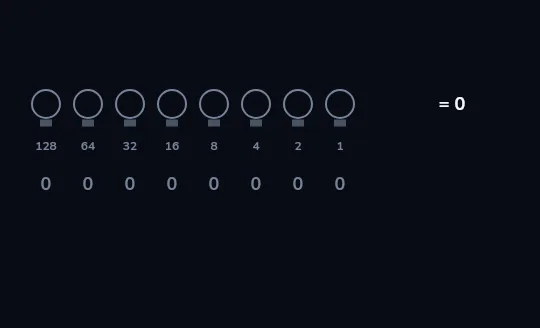
Eight switches, all off A row of eight bulbs, one byte, with their place values printed underneath: 128, 64, 32, 16, 8, 4, 2 and 1. Every bulb is off, so the digits read 00000000 and the byte holds zero.
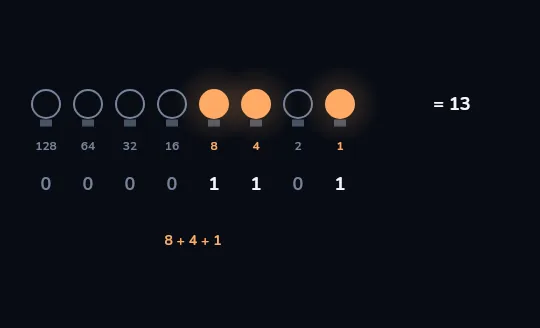
8 + 4 + 1 = 13 Turn on the bulbs over 8, 4 and 1 and the digits read 00001101. Add the lit place values, 8 + 4 + 1, and the byte holds 13.
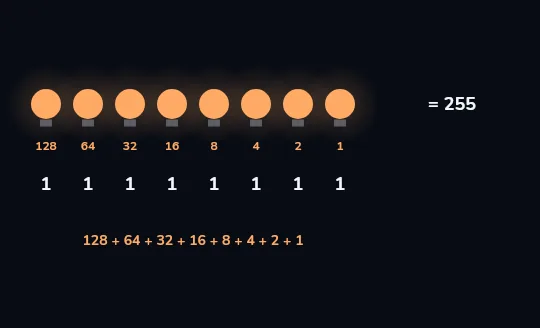
All on: 255 All eight bulbs on reads 11111111, which is 128 + 64 + 32 + 16 + 8 + 4 + 2 + 1 = 255, the biggest number one byte can hold. Counting zero, that makes 256 different values.
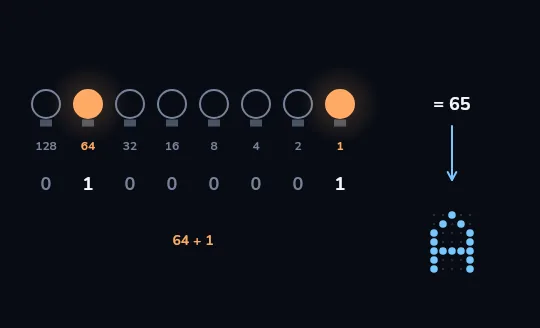
65 is the letter A Now only the bulbs over 64 and 1 are lit: 01000001, which is 65. When the computer treats this byte as text, 65 is the agreed code for a capital A. The bits don't change; only how they're read does.
Check yourself
How many different values can one byte (8 bits) hold?
- 8
- 255
- 256
- 16
Show the answer
256
Right. Each bit doubles the count, so 8 bits give 2 × 2 × 2 × 2 × 2 × 2 × 2 × 2 = 256 values: 0 to 255.
TEXT IS NUMBERS
Letters by agreement
A byte doesn't know it's a letter. Computers simply agree on a code: A = 65, B = 66, a lowercase a = 97. Today's shared code is Unicode, which gives a number to every character in every script, from English and Persian to emoji. In the common UTF-8 format an English letter takes 1 byte and a Persian letter usually takes 2.
The Persian letter ب is Unicode number U+0628 and is stored as 2 bytes. So a Persian text message usually takes about twice as many bytes as an English one with the same number of letters.
COLOURS ARE NUMBERS
A pixel is three bytes
Each dot on a screen, a pixel, is usually described by three bytes: how much red, green and blue light to mix, each from 0 to 255. (255, 0, 0) is pure red, (0, 0, 0) is black and (255, 255, 255) is white. A photo is just a long list of these numbers.
A 12-megapixel photo has 12 million pixels × 3 bytes ≈ 36 MB of raw numbers. Saved as a JPEG it's usually several times smaller, because the format compresses the numbers.
Check yourself
The letter A is stored as 65. What is 65 as an 8-bit binary byte?
- 01000001
- 01100101
- 10000010
- 00100001
Show the answer
01000001
Right. 65 = 64 + 1, so there's a 1 under the 64 and under the 1, and 0 everywhere else: 01000001.
Check yourself
- With 3 bits you can make 8 different patterns: 000, 001, 010, 011, 100, 101, 110 and 111.
- With 4 bits you can make 16 different patterns: the same 8, once with a 0 in front and once with a 1 in front.
What happens to the number of possible values each time you add one more bit?
- It goes up by one
- It doubles
- It goes up by eight
- It stays the same; only the biggest number changes
Show the answer
It doubles
Exactly. The new bit can be 0 or 1 in front of every old pattern, so the count doubles: 8, 16, 32 and so on up to 256 for a byte.
Lesson recap
- A bit is one switch, off (0) or on (1); computers use two states because they're easy to tell apart reliably.
- Binary place values double from the right, 1, 2, 4, 8 and so on; add the places holding a 1, so 1101 is 13.
- A byte is 8 bits: 256 patterns, holding 0 to 255. Each extra bit doubles the count.
- Text is numbers by agreement: A is 65 (01000001), and Unicode covers every script, Persian letters usually taking 2 bytes.
- A pixel is usually three bytes of red, green and blue, so a photo is a long list of numbers.