
Storage and files: memory that survives
Compare SSDs and hard disks, see how a file system turns names like photo.jpg into blocks on the disk, and why a program must be copied into RAM before it can run.
Two ways to remember
Hard disk (HDD)
Magnetic platters spinning, commonly at 5,400 or 7,200 turns a minute, with an arm that swings to the right track.
Finding data takes roughly 5-10 milliseconds, because parts have to physically move.
Cheap per gigabyte; still common for big backups.
SSD
Flash memory chips with no moving parts at all.
A read takes roughly tens of microseconds, about a hundred times quicker than a hard disk to find data.
But still around a thousand times slower than RAM. All these figures are approximate.
Check yourself
Why does a hard disk take milliseconds to find data, while an SSD takes only microseconds?
- The hard disk stores its data in a more complicated code
- The hard disk has to move its arm and wait for the platter to spin round; the SSD has no moving parts
- The SSD is always much smaller, so there is less to search
- The hard disk is connected with a longer cable
Show the answer
The hard disk has to move its arm and wait for the platter to spin round; the SSD has no moving parts
Right. A hard disk is mechanical: the arm has to swing to the track and the right spot has to spin under it. Moving metal takes milliseconds; an SSD just reads electrically.
File system
The part of the operating system that organises a disk. The disk is divided into fixed-size blocks, commonly 4 KB each, and the file system keeps a table: each file's name, its folder, size and dates, and which blocks hold its contents. A file's blocks don't have to sit next to each other. Common file systems are NTFS on Windows, APFS on Macs and iPhones, and ext4 on many Linux machines and Android phones.
photo.jpg, 12 KB, might sit in blocks 17, 18 and 42. The table remembers that list, so the disk itself never needs to know what a photo is.
THE KEY RULE
The processor can't run anything straight from the disk
The processor only fetches instructions and data from memory addresses, which means from RAM (through the caches). The disk is too slow and isn't wired up that way. So opening an app or a file means copying it from storage into RAM first, and then the processor works on the copy. Saving is the reverse: copying from RAM back to the disk, so it survives the power going off.
Open a document, type for an hour, and the changes live only in RAM. Press save and they're copied to the SSD.
Check yourself
Because SSDs are fast, a modern processor runs an app's instructions directly from the SSD without copying them into RAM.
Show the answer
False
False. Even a fast SSD is roughly a thousand times slower than RAM, and the processor only fetches from memory addresses. The app's code is copied into RAM first, and the processor runs it from there.
Step through it
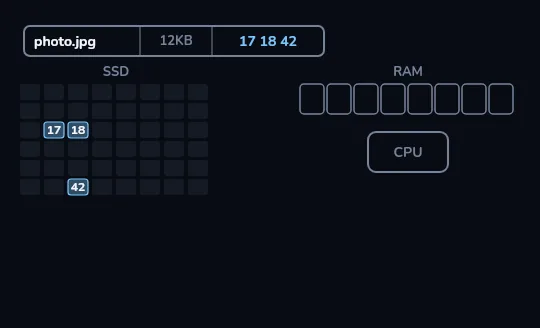
photo.jpg is blocks 17, 18 and 42 On the left is an SSD drawn as a grid of blocks. Three are coloured: 17, 18 and 42, and they aren't all next to each other. The small table above is the file system's entry: photo.jpg lives in those three blocks.
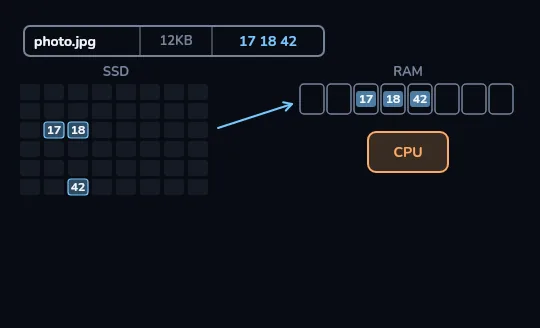
Opening the photo copies its blocks into RAM You open the photo. The three blocks are copied along an arrow into three cells of RAM on the right, side by side this time, and the processor below RAM lights up. Now the photo viewer can work on it, because the processor can reach RAM.
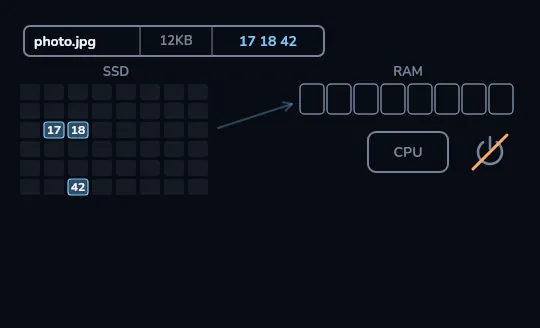
Power off: RAM empties, the SSD keeps its blocks Now the power goes off. The RAM strip empties, just as in lesson 7. But blocks 17, 18 and 42 on the SSD stay coloured: the photo is still there, waiting to be copied in again next time.
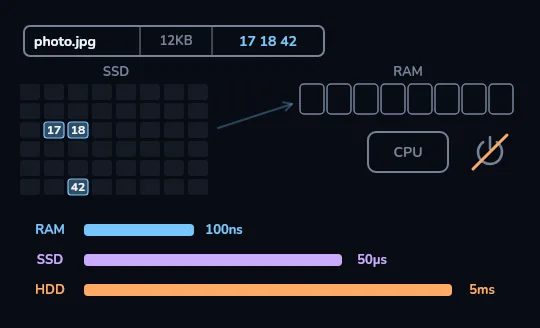
The price of remembering Three bars on a stretched scale: RAM about 100 nanoseconds, an SSD about 50 microseconds, a hard disk about 5 milliseconds. An SSD is roughly a thousand times slower than RAM, and a hard disk slower still. These are rough figures.
Check yourself
In the frames, how did the computer know that photo.jpg was in blocks 17, 18 and 42?
- The processor searched every block for something that looked like a photo
- The file system's table lists each file's name and the blocks that hold it
- Photos are always stored in the lowest free blocks
- The blocks are named after the file
Show the answer
The file system's table lists each file's name and the blocks that hold it
Right. The file system keeps a table of names, folders, sizes and block lists. Looking up photo.jpg gives 17, 18 and 42 without searching anything.
What happens when you open photo.jpg
- Look up the name
The file system finds photo.jpg in its table: 12 KB, blocks 17, 18 and 42.
- Read the blocks
The SSD reads those three blocks, in roughly tens of microseconds each.
- Copy into RAM
The bytes are placed in RAM, where the processor can reach them by address.
- Work on the copy
The viewer decodes the photo and draws it. Until you save an edit, the file on the SSD is unchanged.
Check yourself
When Arash deletes a file and empties the recycle bin, its bytes are always gone from the disk at that exact moment.
Show the answer
False
False. Usually only the table entry is removed and the blocks are marked free. The bytes may stay until they're overwritten (on SSDs, TRIM often clears them soon after). That's why secure erasing is its own step.
Check yourself
Which of these keep their data when the power is switched off?
- RAM
- The L1 cache
- The processor's registers
- An SSD
- A hard disk
- A USB flash drive
Show the answer
Forgets without power: RAM, The L1 cache, The processor's registers
Keeps data with power off: An SSD, A hard disk, A USB flash drive
Lesson recap
- Storage is non-volatile: it keeps apps, photos and the operating system with the power off.
- A hard disk moves an arm over spinning platters and takes milliseconds; an SSD has no moving parts and takes tens of microseconds, still about a thousand times slower than RAM.
- A file system divides the disk into blocks and keeps a table of each file's name and blocks, which needn't be next to each other.
- The processor can't run anything from the disk: opening copies it into RAM, and saving copies it back.
- Deleting usually just removes the table entry, so the bytes may linger until they're overwritten.