
Packets: chopping a message into pieces
See why every message on the internet travels as small numbered packets instead of one lump, how they can arrive out of order and get reassembled, and why that design survives a lost piece so cheaply.
THE UNIT
A packet, and its header
Any message you send — a page, a photo, a chat — is chopped into small chunks called packets. Each one carries a small header: where it's from, where it's going, and its number in the sequence. The header is what lets the network route it and lets the receiver rebuild the message correctly.
A photo might become hundreds of packets, each maybe a couple thousand characters of data with a tiny header stuck to the front.
Check yourself
What does a packet's header actually contain?
- The full message, compressed smaller
- Where it's from, where it's going, and its number in the sequence
- The password of the person sending it
- A copy of every other packet in the message, in case one is lost
Show the answer
Where it's from, where it's going, and its number in the sequence
Right. The header is small on purpose — just enough to route the packet and place it back in order.
A book sent page by page, not glued shut
Imagine mailing a 300-page book by tearing out each page, numbering it, and sending the pages separately instead of the bound book. Different pages could travel by different vans and arrive in any order; the reader just sorts them by number before reading. Where the analogy breaks: real packets don't need a person to sort them — your device does it instantly and you never see the mess.
Check yourself
All the packets of one message always travel the exact same physical route, one behind another, like cars in a single lane.
Show the answer
False
False. Different packets of the same message can take different routes across the network depending on traffic and available paths at that moment. That's exactly why they can arrive out of order — they didn't all travel the same road.
Step through it
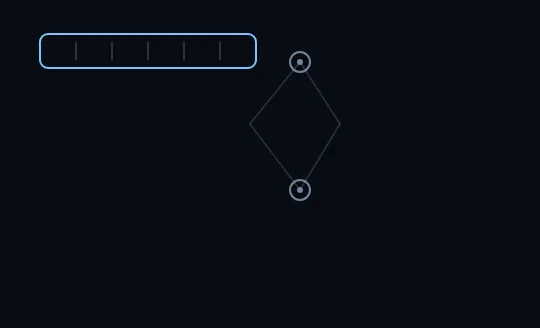
One message, not yet split A single message sits as one bar at top left, with faint divisions hinting it could be split. Two routers form a diamond in the middle, but nothing has been sent yet — the right side of the picture is still empty.
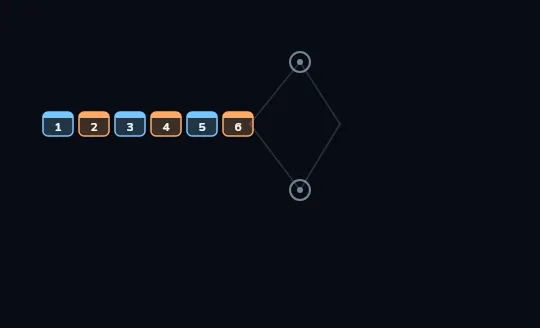
Six numbered packets, ready to go The single bar has become six small, numbered packets in a row, each with its own coloured header strip. Blue-headed packets (the odd numbers) are about to take the top route through the routers; orange-headed ones (the even numbers) will take the bottom.
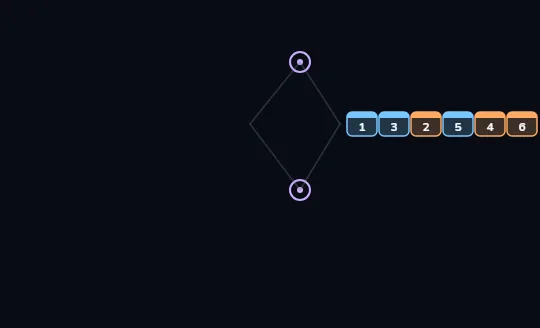
They arrive out of order The packets have crossed the two routers, odd numbers along the top and even numbers along the bottom, and now sit on the right in the order 1, 3, 2, 5, 4, 6. Taking different routes meant they didn't all take the same amount of time, so they landed out of sequence.
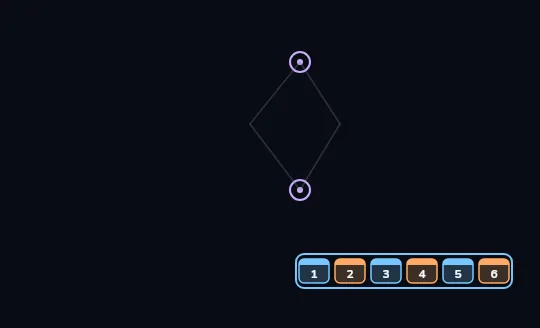
Reassembled, in order The same six packets now sit inside one bar at the bottom right, back in the order 1 through 6. The receiver used the number in each header to put them back where they belong; the message is whole again.
Check yourself
The diagram shows packets landing in the order 1, 3, 2, 5, 4, 6. How does the message end up correctly reassembled as 1 through 6?
- It doesn't — a message that arrives out of order is simply broken
- The sender resends the whole message in the right order once it notices the mistake
- The receiver reads each packet's header and places it by its number
- The routers fix the order themselves before the packets arrive
Show the answer
The receiver reads each packet's header and places it by its number
Right. Order at arrival doesn't matter because every packet's header carries its number. The receiver just slots each one into its place.
WHY BOTHER
Small pieces beat one giant lump
Sending a message as many small packets instead of one giant block does two things. First, it shares the wire fairly: your packet and your neighbor's can interleave on the same link instead of one huge message hogging it for seconds. Second, it makes loss cheap: if one packet is dropped, only that small piece has to be resent — not the whole page or photo again.
Losing packet 4 out of 6 costs a quick resend of packet 4. Losing the same data sent as one lump means starting the whole thing over.
Check yourself
Sort each fact to the reason it's true
- Your video call and your download can use the same connection at once
- One weak Wi-Fi moment only costs you a resend of a few packets, not the whole file
- Many people can share one office internet line without one download freezing everyone else
- A photo upload that drops one packet doesn't restart from zero
Show the answer
Because packets share the wire: Your video call and your download can use the same connection at once, Many people can share one office internet line without one download freezing everyone else
Because a lost packet is cheap to redo: One weak Wi-Fi moment only costs you a resend of a few packets, not the whole file, A photo upload that drops one packet doesn't restart from zero
What this means for you
- A page, photo or message you send is never one lump — it's many small packets, each carrying its own header.
- Packets from the same message can take different routes and land out of order; the receiver reorders them by number.
- Splitting shares one connection fairly among many people and many apps at once.
- When something drops mid-transfer, usually only a few packets are lost, and only those get resent.
Check yourself
- You send a 50-page document as 50 separate small packets; one is briefly lost and gets resent.
- You send the same document as one giant packet; it's briefly lost and gets resent.
In both cases something is briefly lost and has to be resent. What actually differs between them?
- Nothing differs; both cost the exact same amount of resending
- In the first case only a tiny piece is resent; in the second, the entire 50-page document has to be resent
- The second case is always faster because there's only one thing to track
- Packets can be lost but a single giant transfer never can be
Show the answer
In the first case only a tiny piece is resent; in the second, the entire 50-page document has to be resent
Exactly. Splitting the document means a loss only costs the size of one small packet. Sending it whole means any loss costs the entire document, resent from scratch.
Lesson recap
- Any message is chopped into small packets, each with a header: where it's from, where it's going, its number.
- Packets from the same message can travel different routes and land out of order.
- The receiver uses each header's number to put the message back together correctly.
- Splitting a message shares the connection fairly and makes a lost piece cheap to resend.