
Routers: finding a path, and another one
A router only knows its own neighbours, not the whole internet, yet your packets still cross the world and find their way around a broken link. See what a hop is, why no single map of the internet exists, and why a site down the street can still take the long way round.
THE ONLY JOB
A router only knows its own neighbours
A router isn't a mastermind with a full map of the internet. It knows the handful of machines directly connected to it, and for each destination it's heard of, which of those neighbours looks like the better next step. When a packet arrives, the router doesn't work out the whole journey; it just forwards the packet to that one neighbour and lets the next router make its own small decision.
It's less like a pilot flying a planned route and more like a relay runner: take the baton, hand it to whoever's next in the right direction, done.
Check yourself
Omid imagines a router as a machine that has already memorized the exact route every packet should take, start to finish. What's wrong with that picture?
- Nothing, that's essentially what a router does
- A router only knows its neighbours and sends a packet toward the one that looks closer to the destination
- A router only works if a person tells it the full path in advance
- A router doesn't decide anything at all; it just copies every packet to every machine it knows about and lets them sort it out
Show the answer
A router only knows its neighbours and sends a packet toward the one that looks closer to the destination
Right. No router holds a full route. It only knows its neighbours and picks whichever one looks like the better next step, over and over, router by router.
NO OWNER, NO MAP
Every router your packet passes is a hop
Each router along the way is one hop. A packet crossing town or crossing the ocean might take anywhere from a handful of hops to a couple dozen, and there are usually several possible chains of hops that would get it there. No single company or server owns the whole map; the internet is thousands of networks, each one only really in charge of its own small piece and its handful of connections to its neighbours.
That's also why one broken machine rarely breaks the whole internet: your packet just has other chains of hops available to try.
Check yourself
Somewhere there is one server that keeps a complete, up-to-date map of every router and link on the internet, and every router checks with it before sending a packet.
Show the answer
False
False, and that's the whole point of how it works: no such server exists. Every router only knows what its own neighbours have told it, and a packet finds its way through thousands of small, local decisions instead of one central plan.
Step through it
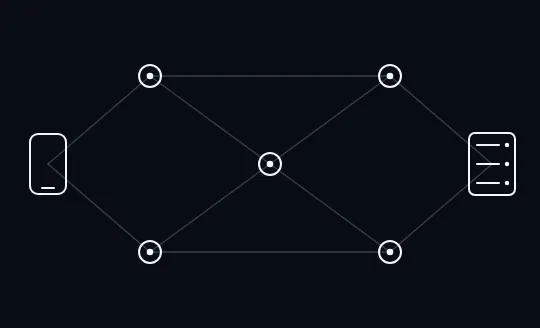
A mesh of routers, no path chosen yet Between your phone and the server sit five routers, joined by several links running between them. None of those links is highlighted, because no path has been picked yet: nothing decides the route until a packet actually needs to move through it.
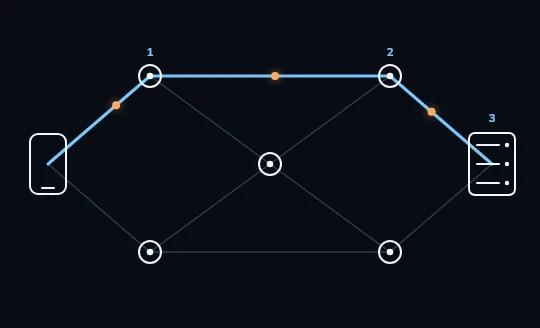
One path lights up, hop by hop One path lights up in blue: from your phone to a first router (hop 1), on to a second router (hop 2), and into the server (hop 3). The orange dots moving along the line are packets travelling that path, one hop at a time rather than in a single straight line.
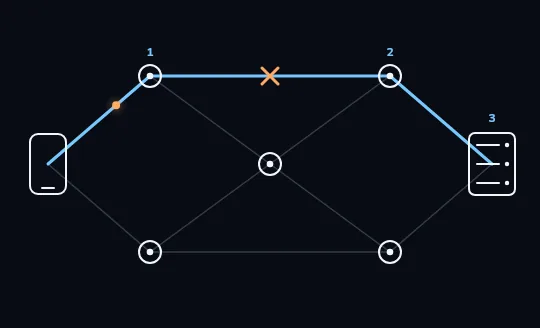
The link between hop 1 and hop 2 goes down An orange X now marks the link between the first and second router: it has gone down. Packets that reach the first router have nowhere to go along the old path any more, so they stop there instead of continuing to the server.
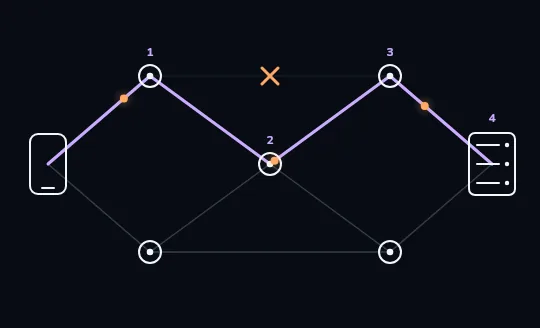
A new path forms around the break The routers around the break find another way through: a lilac path now runs from your phone, through the first router, into a different router in the centre, on to a third router, and finally the server, four hops in all. Packets are moving again, just along one hop more than before.
Check yourself
In the frames you just watched, what happened right after the link between the first and second router broke?
- All traffic to the server stopped for good
- The packets waited at the first router until that exact link came back
- The routers around the break found a different path, using one more hop than before
- The server itself rerouted the packets before they even left your phone
Show the answer
The routers around the break found a different path, using one more hop than before
Right. Nothing stayed stuck: the routers near the break worked out a different way through, even though it cost one extra hop.
STAYING UP
Routers notice a break and pass the word along
Routers regularly tell their neighbours which destinations they can reach. When a link between two of them goes down, the routers on either side notice within moments and update what they tell everyone else: that path is gone, use this other one instead. None of them needed permission from a central authority to make that change; it's thousands of small, local updates happening constantly.
It's part of why the internet as a whole is hard to take down: it was never built around one link that everything depends on, only around routers each willing to try a different neighbour.
Check yourself
Sort each statement into what a router actually does
- Forwards a packet to whichever neighbour looks closer to the destination
- Keeps a full, up-to-date map of every router on the internet
- Notices when a link it's directly connected to goes down
- Picks a path based on kilometres of physical distance
- Tells its neighbours which destinations it can currently reach
- Guarantees a packet's path never changes once chosen
Show the answer
What a router does: Forwards a packet to whichever neighbour looks closer to the destination, Notices when a link it's directly connected to goes down, Tells its neighbours which destinations it can currently reach
What a router does NOT do: Keeps a full, up-to-date map of every router on the internet, Picks a path based on kilometres of physical distance, Guarantees a packet's path never changes once chosen
Check yourself
- You message a friend down the same street, using the same internet provider as you. The reply crosses only a couple of hops.
- You message a shop two streets away that uses a completely different internet provider. The reply crosses several routers on the way, even though the shop is physically closer than your friend.
What best explains the difference between these two cases?
- The message to the shop was bigger
- Physical distance alone decides how many hops a packet takes
- The path a packet takes depends on which networks and routers actually connect the two sides, not how close they are on a map
- The shop's server is simply slower to respond
Show the answer
The path a packet takes depends on which networks and routers actually connect the two sides, not how close they are on a map
Exactly. Your friend, on the same provider, likely shares a router or two with you already. The shop, on a different provider, is only reachable through whatever chain of hops connects the two networks, however roundabout that turns out to be.
Lesson recap
- A router only knows its own neighbours and which one looks closer to a destination, not the whole internet.
- Every router a packet passes through is a hop, and a path is just the chain of hops it happened to take.
- No single map or company owns the internet; thousands of networks pass packets along, one small decision at a time.
- When a link fails, the routers around it notice within moments and traffic finds another way, often with a different number of hops.
- A path is decided by which networks connect, not by physical distance, so close on the map isn't always close on the network.