
DNS: the internet's phone book
DNS turns the name you typed into the address a machine actually needs, in a few quick asks you never see. Learn why that answer gets remembered for a while, and what it usually means when a site won't load for you but loads fine for a friend.
NAMES VS NUMBERS
You think in names, the network thinks in numbers
Every device that talks on the internet has an address, a number like 203.0.113.5. That's what routers and servers actually use to find each other; a name means nothing to them. Names exist for you, so you don't have to remember a string of digits for every site you like. DNS, the Domain Name System, is the service that turns a name like example.com into the address sitting behind it.
Nobody types 203.0.113.5 into their phone to check a site. They type example.com, and DNS quietly hands the phone the number the page actually lives at.
Check yourself
Sara opens example.com on her phone by typing just the name. Why does her phone still end up needing a number like 203.0.113.5?
- Because the name and the number are just two ways of writing the exact same thing, and either one works on its own
- Because machines find each other by address, not by name, so the name has to be looked up first
- Because typing numbers is faster than typing names for a computer
- Because her phone already stores every possible address in advance, just in case
Show the answer
Because machines find each other by address, not by name, so the name has to be looked up first
Right. A name is for people. Routers and servers only know how to find an address, so before anything can connect, that address has to be looked up.
THE MIDDLEMAN
A resolver does the asking for you
The lookup isn't done by your phone alone. It's handed to a resolver, a server that specializes in exactly this, almost always run by your internet provider or set in your phone's network settings. You send it a name; it works out the address, using what it already remembers plus, when it doesn't, asking a few other servers on your behalf, the way asking your way to one office in a huge building means checking with the lobby, then a floor, then a wing, each one only knowing its own small piece.
You never see the resolver working. You type example.com and, within a blink, your phone already has a number to connect to.
Check yourself
Negar's phone can always figure out an address it has never asked for before, without contacting anything outside itself.
Show the answer
False
False. For a name it hasn't looked up recently, the phone hands the question to a resolver, which asks other servers on the network. Nothing about that lookup happens inside the phone alone.
Step through it
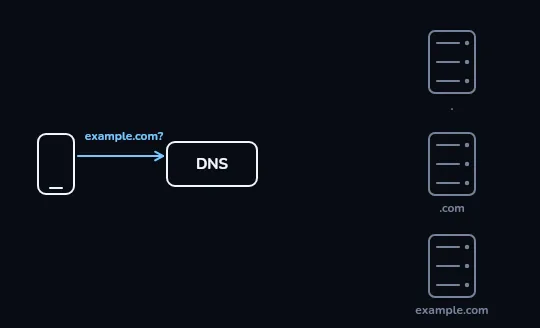
The phone asks its resolver about example.com Your phone only knows the name example.com, so it sends the question to the resolver, labelled DNS here, usually run by your provider or set on your phone. On the right sit three servers it might need: the root, the .com servers, and example.com's own name server, all still faint because nothing has been asked yet.
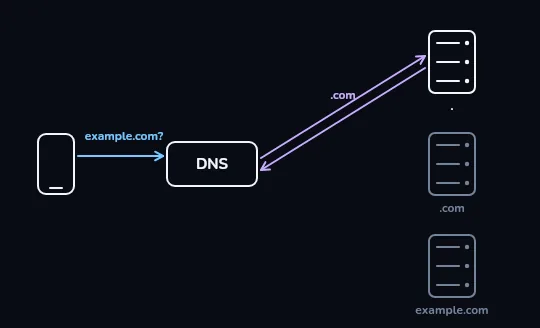
The resolver asks the root, which points to .com The resolver doesn't know example.com's address either, so its first stop is the root server, lit up now. The root doesn't hand back any address; it only knows which servers handle every .com name, and its answer, ".com", sends the resolver there next.
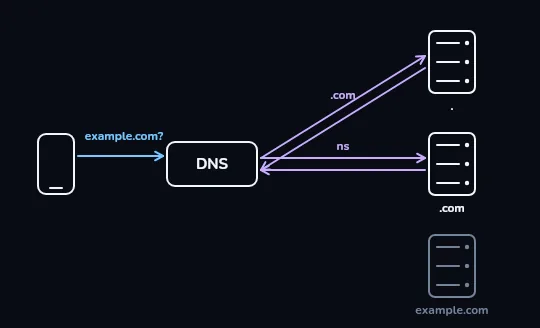
The .com server points to example.com's own name server Next the resolver asks the .com server. That server doesn't hold example.com's address either; it hands back the name of the one server that does, example.com's own name server, marked ns here. The root, still lit from the step before, stays visible on the right.
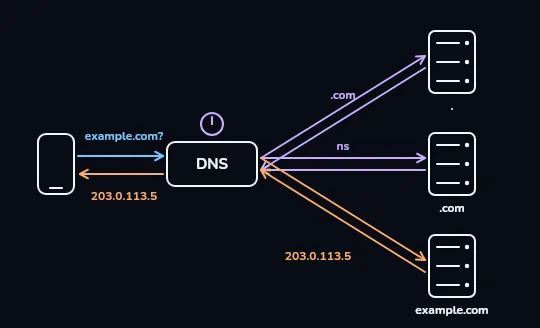
example.com's own server answers, and the clock starts example.com's own name server finally answers with the real address, 203.0.113.5, shown in orange, and the resolver passes it straight back to the phone. The small clock above the resolver is its TTL: how long it will keep this answer before it has to ask again.
Check yourself
Using the walk you just watched, which server is actually the one that knows example.com's exact address?
- The root server
- The .com server
- example.com's own name server
- Your phone's resolver
Show the answer
example.com's own name server
Right. The root only points to where .com lives, and the .com server only points to example.com's own name server. That last server is the one that actually holds the address.
WHY IT FEELS INSTANT
Most lookups never leave the resolver
That clock you saw is the answer's TTL, time to live. The resolver keeps the address for a while, anywhere from a few minutes to roughly a day depending on the site, and hands it straight to the next person who asks, without repeating the whole root, then .com, then name-server walk. That's most of why day-to-day browsing feels instant: the full lookup happens rarely, and a cached answer covers everyone else in between.
Thousands of people can share one provider's resolver. The first person to open example.com that morning pays for the full walk; everyone behind them, for a while after, gets the cached answer in a moment.
Check yourself
Match each part of the lookup to what it does
Show the answer
- Root server → Knows only which servers handle .com names
- .com server → Knows only where example.com's own name server is
- example.com's own name server → Actually holds the real address
- TTL → How long the resolver keeps an answer before asking again
Check yourself
- example.com just moved to a new server. Omid, who visited the site an hour ago, reloads it now and it still fails to load.
- At the same moment, a friend on a completely different internet provider opens example.com for the first time today, and it loads fine.
What's the most likely reason these two people see different results right now?
- Omid's friend has a faster phone
- Omid's resolver is still holding the old address from before the site moved, within its TTL, while the friend's resolver asked fresh and already got the new one
- example.com only works for some countries
- Omid typed the address wrong the second time
Show the answer
Omid's resolver is still holding the old address from before the site moved, within its TTL, while the friend's resolver asked fresh and already got the new one
Exactly. Different resolvers can be holding different cached answers for a little while after a change, each still valid by its own TTL. That gap, not a broken site, is usually what "it works for my friend but not for me" means.
Lesson recap
- DNS turns a name like example.com into the address, like 203.0.113.5, that machines actually connect to.
- A resolver, usually your provider's or your phone's, does the asking on your behalf.
- For a name it hasn't looked up recently, the resolver works its way down: the root, then .com, then the site's own name server.
- Each answer is kept for a while, its TTL, so most lookups never repeat that walk.
- "It works for my friend but not me" is often just two resolvers a little out of sync on how fresh their cached answer is.