
HTTPS: what the padlock protects
See why anyone sharing your Wi-Fi can read a plain HTTP page, how TLS locks the connection so only the two ends can read it, and what the padlock does and doesn't promise before you ever type a password.
THE RISK
Without it, anyone on the path can read and change it
A request without HTTPS travels as plain text through every device on its way: the router at the café, your internet provider, sometimes more. Anyone in that chain can read exactly what you sent, and, this is the part people miss, can also change it before it arrives: swap a link, alter a price, plant something extra in the page.
On open café Wi-Fi, a stranger with the right tool can watch every plain HTTP page you load, in real time, without touching your phone at all.
Check yourself
Sara connects to the free Wi-Fi at a café and logs into a site that starts with plain http://, not https://. Who, realistically, can see the password she types?
- Nobody at all, because a password is always hidden on the way, whatever kind of address the site has
- Only the site itself, once it arrives
- Anyone on the path between her phone and the server, the café's Wi-Fi included
- Only someone who has physically touched her phone
Show the answer
Anyone on the path between her phone and the server, the café's Wi-Fi included
Right. Plain HTTP is unscrambled text the whole way. Anyone relaying it along the path, including the café's own router, can read it as it passes.
THE FIX
TLS: prove who, agree on a key, then scramble everything
HTTPS runs an extra step called TLS before any page data moves. First the server proves who it is with a certificate: a document signed by an authority the browser already trusts, saying this key really belongs to example.com. Then the two sides agree on a shared key, just for this connection. From that point on, every request and every response is scrambled with that key, unreadable to anyone but the two ends.
It's like sealing a letter after checking the other person's ID, using a code only the two of you agreed on for today.
Check yourself
The certificate in TLS proves the connection is encrypted; it doesn't actually prove which company or person is on the other end.
Show the answer
False
False. It's the opposite: the certificate is exactly what proves who's on the other end, a trusted authority signing that this key belongs to example.com. Encryption itself comes from the shared key the two sides agree on afterward.
Step through it
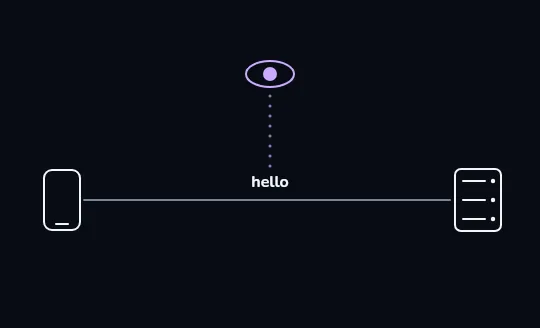
In the clear, anyone can read it A plain word, "hello", travels along the wire between phone and server with nothing hiding it. Above, an eye with a dotted line of sight down to that word stands for anyone sitting on the path — this is what a connection looks like with no HTTPS at all.
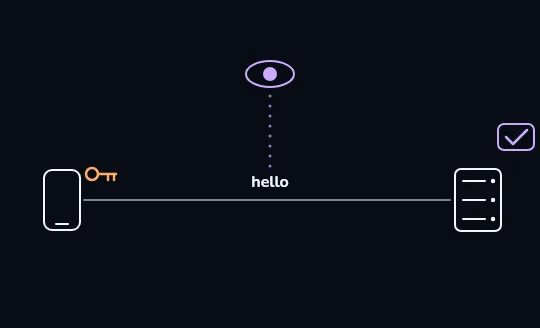
The server sends a key, with a certificate to back it An orange key travels from the server to the phone, and beside the server a certificate appears with a check mark: a trusted authority has already vouched that this key really belongs to example.com. This is the proving-who-you-are step, before anything is scrambled.
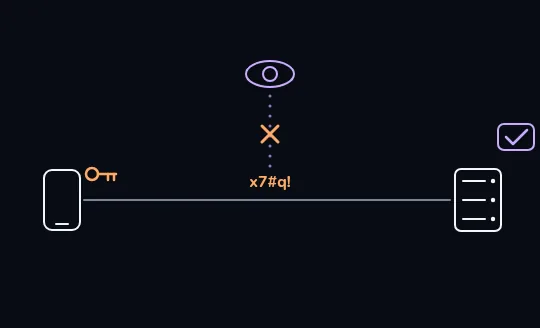
Now the message is scrambled noise The same message now reads x7#q! on the wire, scrambled by the key the two sides just agreed on. The eye above is hollow now and its line of sight is crossed out: the watcher is still there, sitting on the exact same path, but sees only noise.
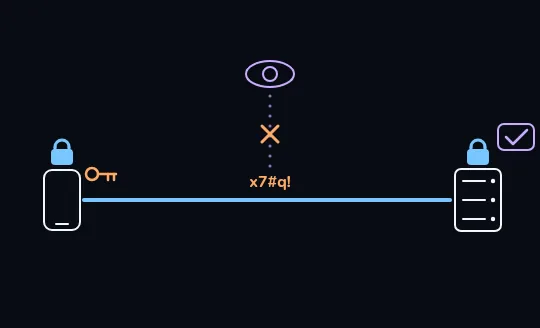
The padlocks close: encrypted end to end Blue padlocks close above both the phone and the server, and the wire between them turns solid blue: this is the padlock you see in your address bar, and it means the whole connection is now encrypted from one end to the other.
Check yourself
In the frames you just watched, the watcher on the path never went away — the wire is still there and still being observed. So what actually changed by the last frame?
- The watcher was physically cut off from the wire, so there was nothing left for it to look at
- The message itself became unreadable to the watcher, who is still on the same wire
- The server stopped sending any data at all
- The certificate deleted the watcher's connection
Show the answer
The message itself became unreadable to the watcher, who is still on the same wire
Right. TLS doesn't remove anyone from the path — it makes what travels across that path unreadable to anyone but the two ends. The watcher can still see traffic; it just can't make sense of it.
THE PADLOCK'S LIMITS
What the padlock does not promise
The padlock only means the connection is encrypted, that's it. It does not mean the site is honest or trustworthy; a scam site can have a padlock too, since anyone can get a certificate for a domain they registered. It does not mean you're on the site you meant to visit; a look-alike address gets its own valid padlock. And it does not mean the site can't see your data, it absolutely can. Encryption protects the trip; the server at the other end reads everything you send it, that's the whole point of sending it there.
A fake bank site at bank-examp1e.co can be fully HTTPS, padlock and all. The padlock only proves nobody eavesdropped between you and that site, not that the site is the real bank.
Check yourself
Match each padlock claim to whether it's true
Show the answer
- The connection to this site is encrypted → True — that's all the padlock promises
- This site is honest and trustworthy → False — anyone can get a padlock, including scammers
- I'm definitely on the site I meant to visit → False — a look-alike address gets its own valid padlock
- The site can't see what I send it → False — the site reads everything you send; encryption only protects the trip there
Check yourself
- Omid opens his bank's real site, sees the padlock and https://, and logs in.
- Omid gets a text with a link to what looks like his bank, opens it, sees a padlock and https:// there too, and is about to log in.
Both pages show a padlock. What should make Omid stop before typing his password into the second one?
- Nothing — a padlock means it's always safe
- He should check the actual address carefully; a padlock alone doesn't confirm it's his real bank
- He should turn off Wi-Fi first
- Padlocks only appear on real bank sites, so the second one must be genuine
Show the answer
He should check the actual address carefully; a padlock alone doesn't confirm it's his real bank
Exactly. A padlock only says the connection is encrypted, not who's actually running the site. A look-alike address earns its own valid padlock just as easily as the real one.
Lesson recap
- Without HTTPS, anyone on the path, café Wi-Fi, your provider, can read and even change what you send.
- TLS proves the server's identity with a certificate, agrees on a shared key, then scrambles everything after.
- A padlock only means the connection is encrypted, not that the site is honest, not that it's the one you meant, and not that it can't see your data.
- No https:// on a login or payment page means close it, no exceptions.