
Why it feels slow: latency and bandwidth
Tell apart the two very different reasons a connection feels slow: how much data arrives per second, and how long one round trip takes. You'll be able to read a speed test and know which fix actually helps.
THE WIDTH OF THE PIPE
Bandwidth: how much arrives per second
Bandwidth is how much data can move through your connection every second, measured in Mbps (megabits per second). Think of it as the width of a pipe: a wider pipe lets more water through per second. More bandwidth mainly helps when you need a lot of data, fast.
A movie file is large. With more bandwidth, more of it arrives each second, so the download finishes sooner.
THE LENGTH OF THE ROAD
Latency: how long one trip takes
Latency is how long a single round trip takes: your click leaves, reaches the server, and the reply comes back, measured in ms (milliseconds). It's roughly the length of the road: distance, plus every router hop on the way, plus a little processing at each end. A bigger pipe doesn't make the road shorter.
A server on the other side of the world might reply in around 150 ms even on a very fast connection, simply because of how far the signal has to travel.
Check yourself
Sara downloads a 2-hour movie and also plays a fast online game where every click has to register instantly. Which pairing is right?
- The movie mainly needs low latency; the game mainly needs bandwidth
- Both need the same thing: more bandwidth
- The movie mainly needs bandwidth; the game mainly needs low latency
- Neither is affected by bandwidth or latency, only by the device
Show the answer
The movie mainly needs bandwidth; the game mainly needs low latency
Right. The movie is a lot of data moving once, so bandwidth decides how fast it finishes. The game sends tiny messages that must arrive back almost instantly, so latency decides whether it feels responsive.
Two questions, two different fixes
Bandwidth
Asks: how much fits through per second? Helps big transfers: downloads, video streaming, big updates. Upgrading your plan raises this.
Latency
Asks: how long does a round trip take? Matters for chat, calls and games. Mostly set by distance and hops, not by your plan's speed.
Check yourself
Omid's video game lags against a server far away, so he upgrades his plan from 50 Mbps to 500 Mbps. That fixes the lag.
Show the answer
False
False, in most cases. The lag he's feeling is latency, set mostly by distance and the number of hops to that server. A bigger pipe moves more data per second but doesn't shorten the road; the round trip still takes about as long.
Step through it
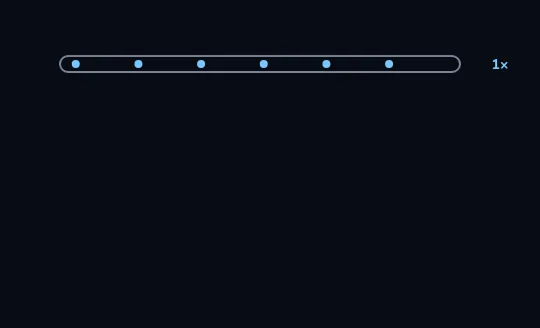
One lane, one speed A single narrow pipe carries one lane of blue dots, marked 1×. This is the baseline: one unit of data arriving per second.
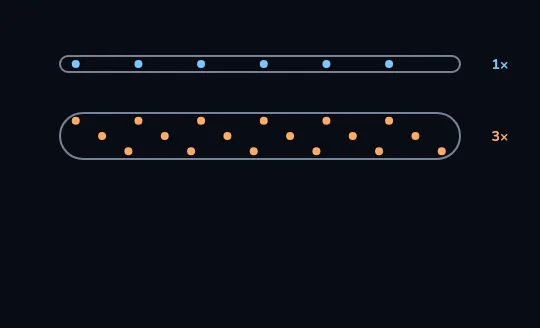
A wider pipe: bandwidth Below it, a wider pipe carries three lanes of orange dots at once, marked 3×. Three times the lanes means three times as much data arrives every second. That's bandwidth: the width of the pipe.
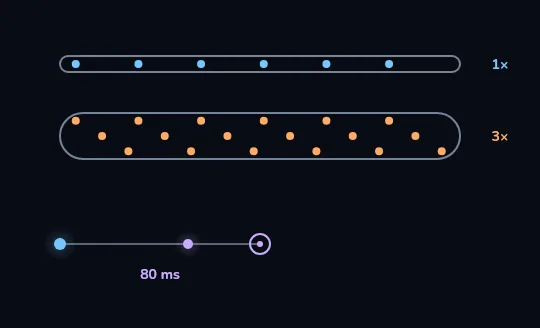
A round trip: latency Below the pipes, a dot travels out from you to a router and back, taking 80 ms. That round trip, regardless of how wide the pipes above are, is latency.
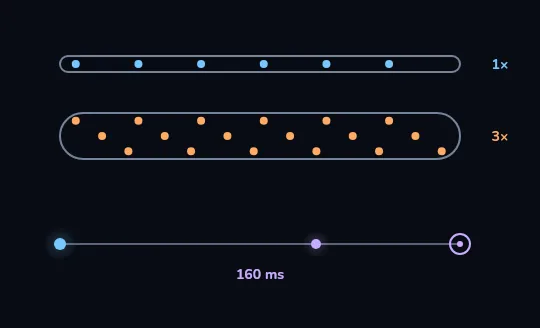
Farther away, longer wait The same trip to a router twice as far now reads 160 ms, double the wait. The pipes above haven't changed at all: distance changes latency, not the bandwidth you have.
Check yourself
Sort each activity by what it mainly needs
- Downloading a large game update
- A voice call that must not lag
- Streaming a movie in high quality
- Clicking to shoot in a fast-paced online game
- Backing up your whole photo library
- Typing in a live chat where replies should feel instant
Show the answer
Mostly needs bandwidth: Downloading a large game update, Streaming a movie in high quality, Backing up your whole photo library
Mostly needs low latency: A voice call that must not lag, Clicking to shoot in a fast-paced online game, Typing in a live chat where replies should feel instant
WHAT ACTUALLY CHANGES LATENCY
A faster plan doesn't shorten the road
Upgrading your bandwidth adds more lanes to the pipe; it doesn't move the server closer or remove a single hop. What does add real delay: each extra hop the signal passes through, and weak Wi-Fi, for example a signal passing through two walls, which can force retries and add its own delay before the trip even starts.
Two people on the same plan: one sits next to the router, one is two rooms away through thick walls. The one far from the router often sees worse lag in a game, even though their download speed test looks almost the same.
Check yourself
- Nima upgrades his home plan from 50 Mbps to 300 Mbps, but keeps playing from the same spot, two rooms from the router, against the same distant game server.
- Nima keeps his 50 Mbps plan, but moves his desk right next to the router.
Which change is more likely to actually reduce the lag he feels in the game?
- Case A, because more bandwidth always reduces round-trip time too
- Case B, because a stronger, more direct Wi-Fi signal removes a source of delay that bandwidth doesn't touch
- Neither, because game lag can never be improved
- Both equally, since bandwidth and latency are the same measurement
Show the answer
Case B, because a stronger, more direct Wi-Fi signal removes a source of delay that bandwidth doesn't touch
Right. Case A adds lanes to the pipe but leaves the road exactly as long. Case B removes walls and distance that were adding real delay to every round trip.
PUTTING IT TOGETHER
A page load needs both, and so does a speed test
Opening a page is not one big transfer; it's many small round trips: look up the name, connect, ask for the page, then ask again for each image and script. Latency stretches every one of those round trips, and bandwidth decides how fast the bigger files finish. A speed test reports both separately: Mbps is bandwidth, ms, often called ping, is latency. A high Mbps with a high ms means a fast pipe on a slow road.
Download: 85 Mbps · Upload: 20 Mbps · Ping: 32 ms. Big downloads on this line will be fast; but 32 ms is still 32 ms for every one of a page's many small round trips.
Lesson recap
- Bandwidth is how much data arrives per second, the width of the pipe.
- Latency is how long one round trip takes, roughly the length of the road.
- Big downloads need bandwidth; chats, calls and games need low latency.
- A faster plan adds lanes, not a shorter road: it rarely fixes lag to a far server.
- A speed test reports both: Mbps is bandwidth, ms is latency.