
Variables: names for values
A variable is a name that points at a value so you can use it later. Learn how = stores a value, how to change it, and why changing one variable doesn't quietly update another.
ASSIGNMENT
price = 5 means: store 5 under the name price
The = sign in Python is assignment, not the equals of maths. Python first works out whatever is on the right, then stores the result under the name on the left. After that, writing price anywhere in your program means 5, until you store something else there.
After price = 5, the line print(price * 2) prints 10.
price = 5
qty = 3
total = price * qty
print(total)15Three names, three values. The third line reads the values stored in price and qty, multiplies them, and stores 15 under total. Only the last line prints anything; assignment itself shows nothing on the screen.
Check yourself
What does the line qty = 3 do?
- Checks whether qty is equal to 3
- Stores 3 under the name qty
- Prints 3 on the screen
- Prints the text qty = 3
Show the answer
Stores 3 under the name qty
Right. A single = stores the value on the right under the name on the left. Nothing is printed and nothing is checked.
REASSIGNMENT
Storing a new value replaces the old one
A variable holds one value at a time. Assign to the same name again and the old value is gone. That's why score = score + 5 is normal code even though it looks wrong as maths: Python reads the old score, adds 5, and stores the result back under score. You'll also see the shorthand score += 5, which does the same thing.
score = 10, then score = score + 5: now score holds 15, and the 10 is gone.
Check yourself
Mina's program has score = 10 and then score = score + 5. What does Python do first on the second line?
- It works out score + 5 using the old value, 10
- It sets score to 0, then adds 5
- It stops, because score can't equal score + 5
- It stores the text score + 5
Show the answer
It works out score + 5 using the old value, 10
Right. The right side always goes first: 10 + 5 is 15, and only then is 15 stored back under score.
Check yourself
price = 5
qty = 3
total = price * qty
print(total)
price = 6
print(total)
15 1515 1818 1815 6
Show the answer
15
15Step through it
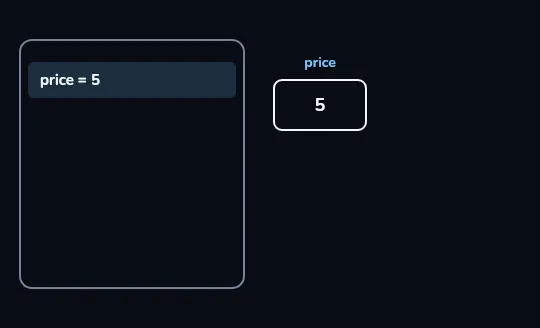
price = 5makes a box called priceThe code panel on the left highlights the line running now,
price = 5. On the right, Python has made a box labelled price and put 5 in it. From now on, price means 5.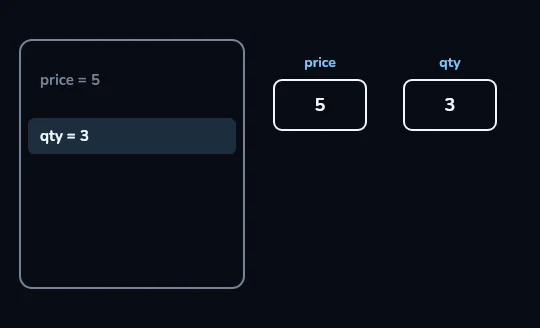
qty = 3gets a box of its ownNow
qty = 3is highlighted and the first line dims, because it's done. A second box, qty, holding 3, appears beside price: every name gets its own box.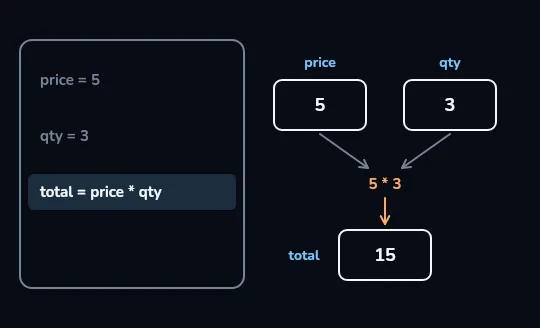
total is worked out from 5 and 3 For
total = price * qty, arrows run from the price and qty boxes into5 * 3: Python uses the values in the boxes right now. The result, 15, goes into a new box called total.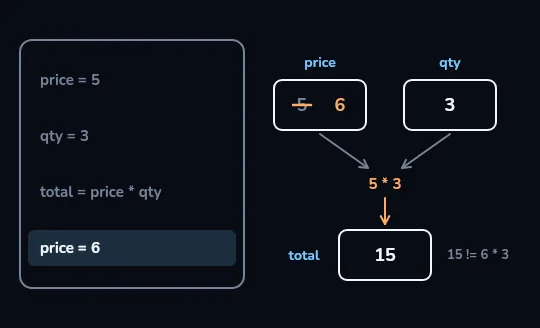
price = 6changes price, but not totalThe last line,
price = 6, strikes out the 5 in the price box and writes 6. total still holds 15, and the dim note beside it,15 != 6 * 3, says it is not 18. Changing price doesn't recalculate total; only running the total line again would.
Check yourself
After total = price * qty, changing price automatically updates total.
Show the answer
False
False. total was worked out once, from the values price and qty had at that moment, and it keeps that result. To get a new total, run total = price * qty again after changing price.
price = 5
qty = 3
total = price * qty
print(total)
price = 6
total = price * qty
print(total)15
18This time the total line runs again after price changes, so the second print shows 18. Try it: delete line 6, run it, and watch the second print go back to 15.
NAMING RULES
Names that Python accepts, and names people can read
A name can use letters, digits and the underscore _, but it can't start with a digit and can't contain spaces. Case matters: Age and age are two different variables. Words Python uses itself, like for and if, can't be names. Python style is snake_case: lowercase words joined by underscores, like total_price. Pick names that say what the value means; t works, total_price explains itself.
second and total_price are fine. 2nd, my name and for all stop with a SyntaxError.
Check yourself
Sort these variable names: which ones would Python accept?
- total_price
- age2
- _count
- 2nd_place
- my name
- for
Show the answer
Valid name: total_price, age2, _count
Not allowed: 2nd_place, my name, for
print(type(5))
print(type(5.0))
print(7 / 2)<class 'int'>
<class 'float'>
3.5Whole numbers are int (integer) and numbers with a decimal point are float. type() tells you which one a value is. Division gives a float, which is why 7 / 2 is 3.5 and 10 / 2 is 5.0. Lesson 4 meets two more types, text and True/False.
Check yourself
price = 5qty = 3total = price * qtyprint(totl)
Show the answer
The bug is on line 4.
Found it. totl is a typo for total. Python has never had a value stored under totl, so it stops with a NameError: name 'totl' is not defined. Recent versions of Python even add: Did you mean: 'total'?
Lesson recap
- A variable is a name for a value;
price = 5stores 5 under the name price. =is assignment: the right side is worked out first, then stored under the name on the left.- Assigning again replaces the old value, so
score = score + 5adds 5 to the current score. - Variables don't update each other: after
price = 6, total stays 15 until its line runs again. - Names use letters, digits and
_, can't start with a digit, and are case-sensitive; using a name that holds nothing is a NameError.