
Input and types
input() lets your program ask a question, but the answer always comes back as text. Learn the main types and how to convert between them, so "7" + "3" stops giving you 73.
ASKING THE USER
input() asks a question and waits
name = input("Your name? ") shows the prompt, waits for the user to type something and press Enter, then hands back what they typed, which is stored in name. The space at the end of the prompt keeps the answer from sticking to the question mark.
If Sara types her name at the prompt, name now holds "Sara" and the program carries on to the next line.
name = input("Your name? ")
print("Hello, " + name)Your name? Sara
Hello, SaraHere the user typed Sara and pressed Enter. The first output line is the prompt with Sara's typing after it; the second is printed by the program. In the app this example is fixed, so the typed answer is shown for you.
FOUR BASIC TYPES
Every value has a type
Python keeps track of what kind of value it's holding. The four you'll use most: int, a whole number like 7; float, a number with a decimal point like 7.5; str, text in quotes like "7"; and bool, which is just True or False. The type decides what operators do: + adds two numbers but joins two strings. type(x) tells you which one x is.
type(7.5) shows <class 'float'>, and type("7") shows <class 'str'>.
Check yourself
Match each value to its type
Show the answer
- 7 → int
- 7.5 → float
- "7" → str
- True → bool
THE CATCH
input() always gives back text
Whatever the user types arrives as a string, even when it's only digits. Type 7 and you get "7", the character, not the number. That's harmless for a name, but for maths it bites: + on two strings joins them instead of adding.
a = "7" and b = "3", just as two input() calls would give them: a + b is "73".
Check yourself
a = "7"
b = "3"
print(a + b)73107 37 + 3
Show the answer
73Step through it
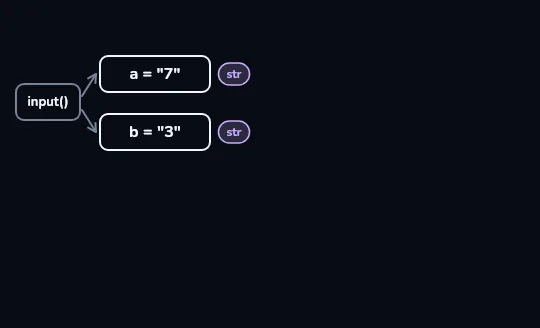
input()hands over "7" and "3" as textThe user types 7, then 3. input() sends each one into its own box, a and b, and the values are drawn with quotes and a small str tag. Digits typed at the keyboard still arrive as text.
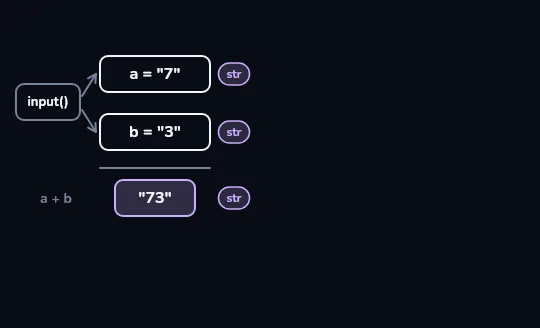
a + bglues them into "73"Under a line,
a + bgives one box holding "73", still tagged str. With two strings, + doesn't add: it joins the characters end to end, 7 then 3.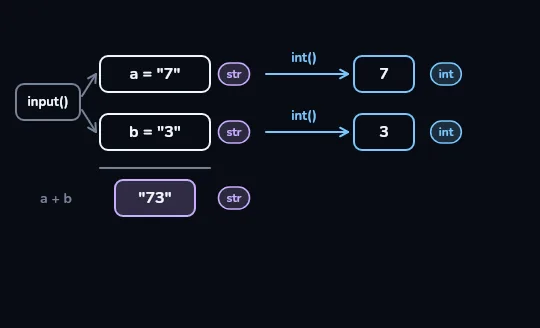
int()turns "7" and "3" into 7 and 3Each string goes along an int() arrow and comes out on the right as a plain number, without quotes and tagged int. The boxes on the left still hold "7" and "3": int() hands back a new value and leaves the original alone.
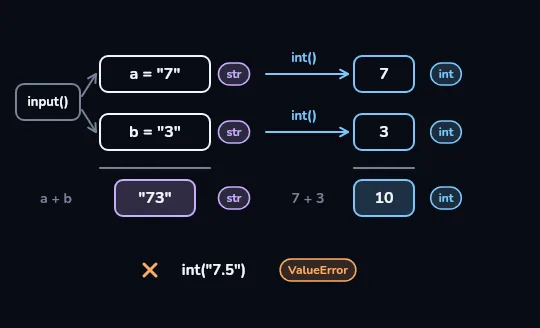
7 + 3is 10, andint("7.5")failsNow
7 + 3really adds: its box shows 10, tagged int, next to the "73" from before. Below,int("7.5")has an orange cross and a ValueError tag: text that isn't a whole number can't become an int, so use float() for decimals.
Check yourself
a = int("7")
b = int("3")
print(a + b)10737 + 3Error
Show the answer
10print(int("7") + 1)
print(float("7.5"))
print(str(7) + "3")
print(int(7.9))8
7.5
73
7int() turns text into a whole number and float() into a decimal. str() goes the other way, number to text, so line 3 joins "7" and "3". The last line surprises people: int(7.9) is 7, because int() cuts off the decimal part; it doesn't round.
bill = float(input("Bill? "))
tip = bill * 0.1
print(f"Tip: {tip}")Bill? 40
Tip: 4.0A tip calculator. The user typed 40. Wrapping input() in float() converts the answer straight away, so bill holds the number 40.0 and the maths works. The same pattern with int() is the usual way to ask for a whole number: age = int(input("Age? ")).
Check yourself
Negar's program runs int("7.5"). What happens?
- It gives 7
- It gives 8
- It stops with a ValueError
- It gives 7.5
Show the answer
It stops with a ValueError
Right. int() only accepts text that is a whole number, so "7.5" stops the program with ValueError: invalid literal for int() with base 10: '7.5'. float("7.5") would work.
Check yourself
age = ____(input("Age? "))
print(age + 1)
int · str · input · print
Show the answer
int
Right. int() turns the typed text into a whole number, so age + 1 does real maths: typing 30 prints 31.
Lesson recap
input("prompt")shows the prompt, waits for Enter, and returns what the user typed.- The four basic types are int (7), float (7.5), str ("7") and bool (True/False);
type()tells you which. - input() always returns a str, so two typed numbers joined with + give "73", not 10.
int(),float()andstr()convert; the usual pattern isage = int(input("Age? ")).int("7.5")is a ValueError, whileint(7.9)cuts to 7 rather than rounding.