
Final project: an expense tracker
Put the whole course together in one small program: read your expenses from a file, add them up by category in a dictionary, and print a report, built one working step at a time.
The plan, before any code
- Input: a file
expenses.txt, one expense per line, written as category,amount.
- Processing: a total per category
Split each line, turn the amount into a number, and add it to that category's total in a dictionary.
- Output: a report
One line per category, then the grand total.
- Build it in steps, run after each
Read and split one line, then loop the whole file, then wrap it in functions, then add features.
THE DATA
Four lines of text, split at the comma
Negar's expenses.txt holds four lines: food,12, bus,3, food,8, rent,50. Each line is read as a string ending in \n. line.strip() removes the \n, and .split(",") cuts the string at the comma into a list of two strings. You can unpack that list straight into two names: category, amount = line.strip().split(","). The amount is still text, "12", so it needs int() before any maths.
"food,12\n" → strip → "food,12" → split(",") → ['food', '12'] → category = 'food', amount = '12'.
Check yourself
print("food,12\n".strip().split(","))['food', '12']['food', 12]['food,12']['food', '12\n']
Show the answer
['food', '12']Right. strip removes the \n, split cuts at the comma, and both pieces are still strings, so 12 is in quotes.
totals = {}
with open("expenses.txt") as f:
    for line in f:
        cat, amt = line.strip().split(",")
        old = totals.get(cat, 0)
        totals[cat] = old + int(amt)
print(totals){'food': 20, 'bus': 3, 'rent': 50}Step 2, with the four-line file. It's lesson 9's counting pattern, adding the amount instead of 1: get(cat, 0) gives 0 the first time a category appears, so food becomes 12 and then 12 + 8 = 20.
Check yourself
After the loop reads food 12, bus 3, food 8 and rent 50, what is totals["food"]?
- 8
- 12
- 20
- "128"
Show the answer
20
Right. The first food line sets it to 12, and the second adds 8 to what's already there: 20.
Step through it

expenses.txt: four lines of text The data starts as a plain document, expenses.txt, holding four lines: food,12, bus,3, food,8 and rent,50. To Python each one is just text, with the amount written in digits.
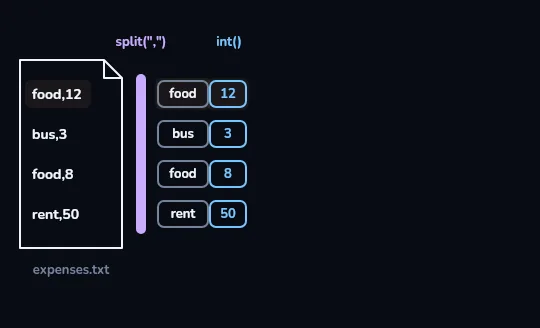
split(",") and int() make pairs Each line passes the split(",") bar and becomes two tiles: a category and an amount, food | 12, bus | 3, food | 8, rent | 50. The amounts sit in the int() column, drawn in blue, because int() has turned them from text into numbers.
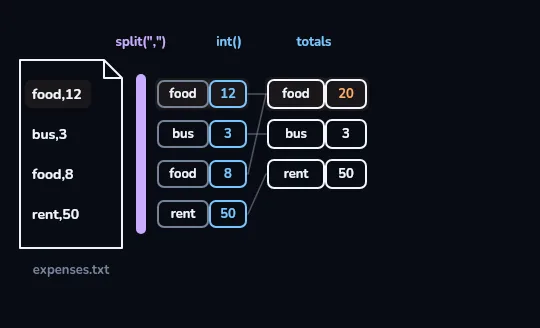
totals: food 20, bus 3, rent 50 The pairs flow into the dictionary totals. Both food pairs, 12 and 8, feed the same food row, which shows 20 in orange; bus and rent each have one pair, so their rows show 3 and 50. Four lines became three categories.
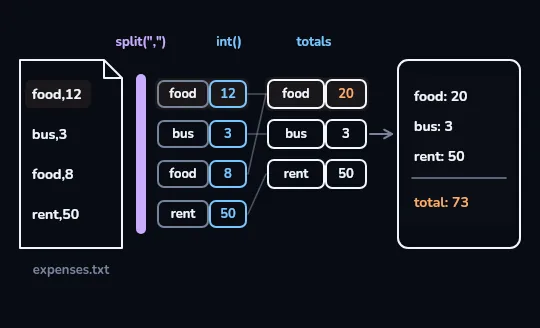
The report: food 20, bus 3, rent 50, total 73 The totals table feeds a report panel on the right: food: 20, bus: 3, rent: 50, then under a dividing line, total: 73 in orange. File, split, int(), loop, dictionary and a print function, each doing one job, working as one program.
Check yourself
totals = {}with open("expenses.txt") as f:for line in f:cat, amt = line.strip().split(",")old = totals.get(cat, 0)totals[cat] = old + amt
Show the answer
The bug is on line 6.
Right. amt came from split, so it's the string "12", and 0 + "12" is a TypeError. Write old + int(amt).
STEP 3: FUNCTIONS
Two functions, two jobs
Once the loop works, give each job a name. load_totals(path) reads a file and returns the dictionary; it doesn't print anything. print_report(totals) takes a dictionary and prints it; it doesn't know about files. Keeping them apart means you can test each on its own, load a different file with the same code, or print a report from totals you made some other way. The last line of the program is then just print_report(load_totals("expenses.txt")).
sum(totals.values()) adds up the values of a dictionary: 20 + 3 + 50 = 73.
def load_totals(path):
    totals = {}
    with open(path) as f:
        for line in f:
            cat, amt = line.strip().split(",")
            old = totals.get(cat, 0)
            totals[cat] = old + int(amt)
    return totals

print(load_totals("expenses.txt")){'food': 20, 'bus': 3, 'rent': 50}The step 2 loop, moved inside a def and indented one more level. It returns the dictionary instead of printing it, so the print at the bottom is only there to test it.
def print_report(totals):
    for cat, amt in totals.items():
        print(f"{cat}: {amt}")
    print("total:", sum(totals.values()))

totals = {"food": 20, "bus": 3, "rent": 50}
print_report(totals)food: 20
bus: 3
rent: 50
total: 73Tested with a dictionary typed by hand, so you know the report works before connecting it to the file. The total line is outside the for loop, so it prints once.
Check yourself
Put the lines in order so they build the totals dictionary from expenses.txt.
Show the answer
totals = {}
with open("expenses.txt") as f:
    for line in f:
        cat, amt = line.strip().split(",")
        totals[cat] = totals.get(cat, 0) + int(amt)
def add_expense(path, cat, amt):
with open(path, "a") as f:
f.write(f"{cat},{amt}\n")
add_expense("expenses.txt", "tea", 4)
print_report(load_totals("expenses.txt"))food: 20
bus: 3
rent: 50
tea: 4
total: 77Step 4, using load_totals and print_report from above. "a" adds tea,4 as a fifth line without touching the other four; with "w" here, Negar would lose her whole week. Run it twice and tea becomes 8.
rows = ["food,12", "", "food,abc"]
for row in rows:
    if not row:
        continue
    cat, amt = row.split(",")
    try:
        print(cat, int(amt))
    except ValueError:
print("bad line:", row)food 12
bad line: food,abcReal files have empty lines and typos. continue skips straight to the next pass when a line is empty, and try / except reports a bad amount instead of crashing. In load_totals, check line.strip() the same way.
Check yourself
Reza's file has a line food,abc, and his load_totals has no try / except. What happens when it reaches that line?
- The line is skipped quietly
- food gets 0 added
- The program stops with ValueError: invalid literal for int() with base 10: 'abc'
- food becomes the text "abc"
Show the answer
The program stops with ValueError: invalid literal for int() with base 10: 'abc'
Right. int("abc") can't make a number, so Python raises a ValueError and, with nothing to catch it, the program stops there.
Where to go from here
- Make it yours. Warn when a category passes a budget with if, or ask for new expenses with input().
- Sort the report. sorted(totals.items(), key=...) can list the biggest spending first; look up how key works.
- Keep building small programs. A to-do list, a quiz, a word counter: each one uses the same pieces.
- Read the official tutorial. The Python tutorial at docs.python.org picks up right where this course ends.
Course recap
- Plan first: input (a file), processing (totals per category), output (a report), then build in small steps and run after each.
- line.strip().split(",") turns "food,12\n" into ['food', '12']; the amount still needs int().
- totals[cat] = totals.get(cat, 0) + int(amt) adds each amount to its category: food 20, bus 3, rent 50.
- load_totals returns the dictionary and print_report prints it, ending with total: 73.
- Append mode adds new expenses safely, and try / except turns a bad line into a message instead of a crash.