
Loops: doing it again
A for loop runs the same lines once for every item in a list or a range. Add things up with a running total, count with range, and use while when you don't know how many times in advance.
THE FOR LOOP
One block of code, run once per item
for s in scores: means "take the items of scores one at a time, and each time, call the current one s". The lines indented under it (4 spaces) are the body of the loop. Python runs the body once for the first item, again for the second, and so on. The name after for is the loop variable: you choose it, and it holds a different item on each pass. The colon at the end of the for line is required.
With scores = [8, 5, 9], the body runs three times: first with s = 8, then s = 5, then s = 9.
scores = [8, 5, 9]
for s in scores:
print(s * 2)16
10
18One print line in the code, three lines of output: the body ran once for each score. Try changing the list or the * 2 and run it again.
Check yourself
names = ["Sara", "Omid"]
for n in names:
    print("Hi " + n)
print("done")
Hi Sara Hi Omid doneHi Sara done Hi Omid doneHi n Hi n doneHi Sara Omid done
Show the answer
Hi Sara
Hi Omid
doneRight. The indented line runs once per name, and print("done") isn't indented, so it runs once, after the loop.
Accumulator (running total)
A variable you create before the loop, change inside it, and use after it. For a sum: start with total = 0, add each item with total = total + s in the body, then print(total) once the loop is over. The same shape counts things (count = count + 1) or builds a list (append).
Adding up Negar's shopping receipts: total starts at 0, grows with each receipt, and the final value is what she spent.
scores = [8, 5, 9]
total = 0
for s in scores:
    total = total + s
print(total)22total goes 0, 8, 13, 22. The print line is not indented, so it runs once, after the last pass, and shows only the final sum.
Check yourself
Omid copies the running-total program but indents print(total) by 4 spaces, so it sits inside the loop. What does it print for [8, 5, 9]?
- 22
- 8, then 13, then 22, each on its own line
- 8, then 5, then 9, each on its own line
- Nothing, because print can't go inside a loop
Show the answer
8, then 13, then 22, each on its own line
Right. Inside the loop, print runs on every pass, so you see the total after each step: 8, 13, 22. A common surprise when you only wanted the final sum.
Step through it
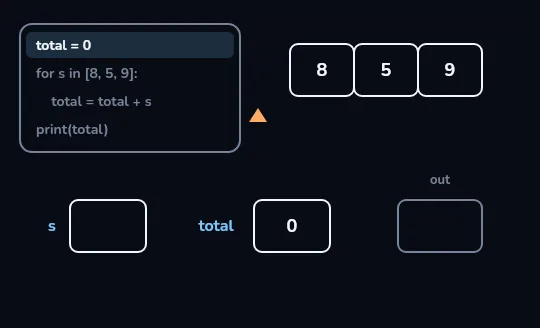
Before the loop: total = 0 The first line, total = 0, is lit in the code panel, so the box total holds 0. The list 8, 5, 9 waits on the right with the pointer still just before it, the box s is empty because the loop hasn't started, and the out panel is blank.
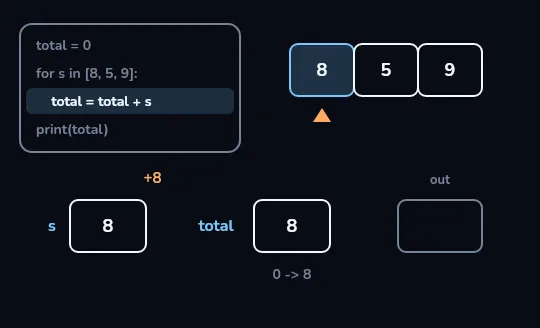
First pass: s is 8, total 0 -> 8 The pointer moves under 8, so s now holds 8, and the lit line total = total + s runs: a +8 goes into total, which changes from 0 to 8. The out panel is still empty, because print(total) comes after the loop.
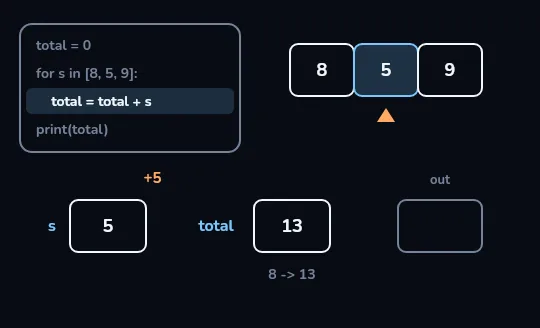
Second pass: s is 5, total 8 -> 13 Same line, next item. The pointer moves under 5, s is replaced by 5, and total = total + s adds it: total goes from 8 to 13. Nothing new was written; the body simply ran again.
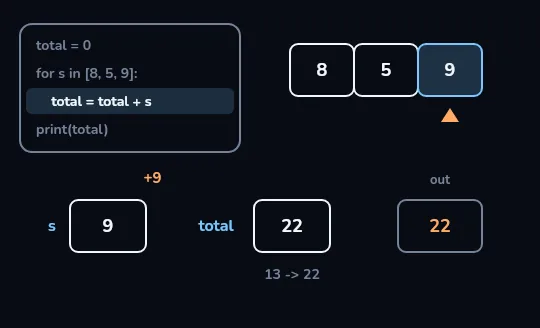
Last pass: total 13 -> 22, then print The pointer reaches 9, s holds 9, and a +9 takes total from 13 to 22. There are no items left, so the pointer leaves the list, the loop ends, and the line after it, print(total), runs once: 22 appears in the out panel.
Check yourself
scores = [8, 5, 9]for s in scores:total = 0total = total + sprint(total)
Show the answer
The bug is on line 3.
Right. total = 0 is inside the loop, so it wipes the total at the start of every pass and the program prints 9, the last score. Move it above the for line.
COUNTING
range gives you numbers to loop over
When you want to repeat something a set number of times, loop over a range. range(5) gives 0, 1, 2, 3, 4: five numbers, starting at 0 and stopping before 5, just like list positions. range(1, 6) gives 1 to 5. If you don't need the number itself, you still write a loop variable; for i in range(3): print("hi") prints hi three times. A for loop also walks through a string, one character at a time: for ch in "abc": gives a, then b, then c.
range(3) → 0, 1, 2. range(1, 4) → 1, 2, 3. The end number is never included.
for i in range(1, 4):
print(i, "x 5 =", i * 5)1 x 5 = 5
2 x 5 = 10
3 x 5 = 15i takes the values 1, 2 and 3, never 4. Giving print several values separated by commas prints them on one line with a space between each.
Check yourself
for i in range(3):
    print(i)
0 1 21 2 30 1 2 33
Show the answer
0
1
2Right. range(3) starts at 0 and stops before 3, so i is 0, 1 and 2.
Check yourself
How many numbers does range(1, 6) give?
- 4
- 5
- 6
- 7
Show the answer
5
Right. It gives 1, 2, 3, 4, 5: it starts at 1 and stops before 6.
for or while?
for
Use it when you have a collection or a known count: every score in a list, every line in a file, 10 times.
It stops by itself when the items run out.
while
Use it when you stop on a condition and can't say in advance how many passes it takes: until the user types quit, while money is left.
while condition: repeats the body as long as the condition is True, checking it before every pass.
n = 3
while n > 0:
    print(n)
    n = n - 1
print("go")3
2
1
goEach pass prints n and makes it one smaller. When n reaches 0, n > 0 is False, the loop stops, and the un-indented print("go") runs.
Check yourself
A while loop always runs its body at least once.
Show the answer
False
False. The condition is checked before every pass, including the first. With n = 0, while n > 0: is False straight away and the body never runs.
Lesson recap
- for x in items: runs the indented body once per item, with x holding the current item.
- A running total starts before the loop (total = 0), grows inside it, and is printed after it.
- Indentation decides what repeats: a print inside the loop runs every pass, one outside runs once.
- range(5) gives 0 to 4, and range(1, 6) gives 1 to 5; the end is never included.
- while repeats as long as its condition is True; make sure something inside changes it, and use break to leave early.