
Strings: working with text
Text in Python is a string, a row of characters in quotes. Join strings, measure them, pick out characters by position, and build sentences with f-strings.
STRINGS
Text lives between quotes
A string is a row of characters inside quotes. Single or double quotes both work, as long as they match: "Sara" and 'Sara' are the same string. Anything in quotes is text, even digits, so "5" is the character 5, not the number five. Letters, spaces, punctuation and Persian text are all characters.
"5" + "5" gives "55", because joining two pieces of text just puts them side by side.
first = "Sara"
last = "Karimi"
print(first + " " + last)
print("ha" * 3)
print(len("Python"))Sara Karimi
hahaha
6+ joins strings end to end, so the space between the names has to be added yourself. * repeats a string. len() counts the characters: Python has 6. Spaces count too, so len("hi there") is 8.
Check yourself
print("ab" * 3)abababab3ab ab ababab
Show the answer
abababINDEXING
Every character has a position, starting at 0
Square brackets after a string pick one character by its position, its index. Counting starts at 0, so in word = "Python", word[0] is P and word[5] is n. Negative positions count back from the end: word[-1] is always the last character. Asking for a position that isn't there, like word[6], stops with IndexError: string index out of range.
Python has 6 characters, so its positions run 0 to 5, one less than its length.
Check yourself
word = "Python"
print(word[0] + word[-1])PnPyPonP
Show the answer
PnStep through it
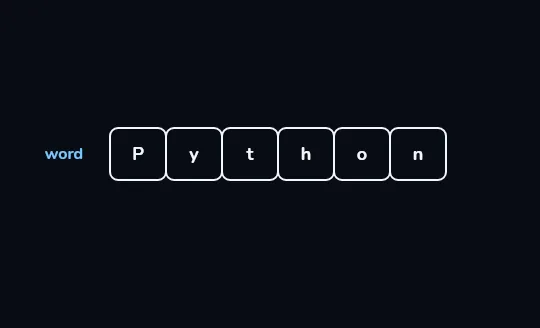
word = "Python": six cells in a rowThe string "Python" is drawn as six cells side by side, one character in each, with the name word on the left. That's all a string is: characters kept in order, each in its own place.
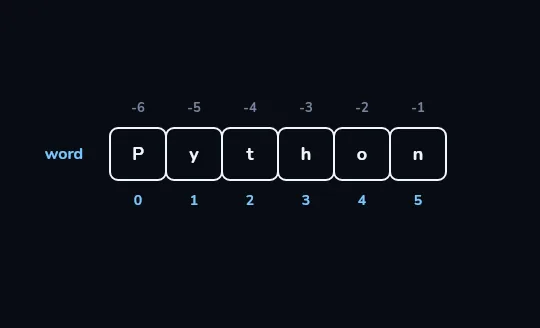
Every cell gets a position number Under the cells are their positions, 0 to 5: counting starts at 0, so the sixth character, n, is at 5. The dimmer row above counts back from the end, from -6 at P to -1 at n.
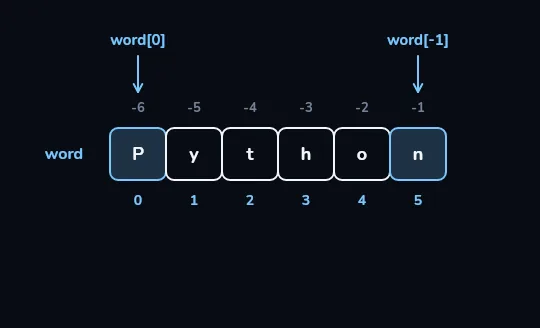
word[0]is P andword[-1]is nSquare brackets pick one character by its position. The arrow
word[0]points down at the first cell, P, andword[-1]at the last cell, n; both cells light up.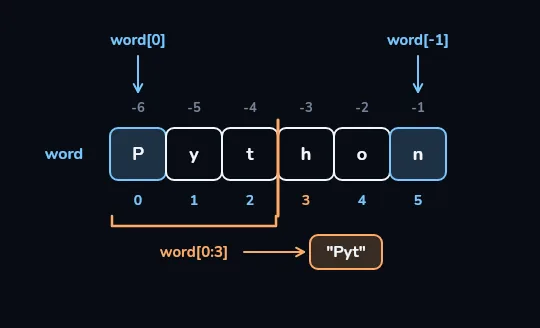
word[0:3]takes cells 0 to 2: "Pyt"A bracket runs under cells 0, 1 and 2, labelled
word[0:3], with an arrow to "Pyt". The orange line stands at position 3, where the slice stops: the start is included and the end isn't, so the h at 3 is left out.
Check yourself
What is "Python"[0:3]?
- Pyt
- Pyth
- yth
- Py
Show the answer
Pyt
Right. A slice starts at the first number and stops just before the second, so it takes positions 0, 1 and 2: P, y and t.
word = "Python"
print(word[2:])
print("sara".upper())
print("  hi  ".strip())
print("a-b".replace("-", "+"))thon
SARA
hi
a+bLeave out the end of a slice and it runs to the end of the string: word[2:] is thon. Methods are actions a string can do, written after a dot: upper() makes capitals, strip() removes spaces at both ends, and replace() swaps one piece of text for another. Each one hands back a new string.
name = "Omid"
age = 30
print(f"{name} is {age}")
print(f"Next year: {age + 1}")Omid is 30
Next year: 31An f-string has an f right before the opening quote. Anything inside curly braces is worked out and dropped into the text, numbers included, so you don't have to convert or join anything yourself. This is the easy way to mix text and numbers.
Check yourself
age = 30print("Age: " + age)
Show the answer
The bug is on line 2.
Found it. + can join two strings, but age is a number, so Python stops with TypeError: can only concatenate str (not "int") to str. Write print(f"Age: {age}"), or turn the number into text with str(age).
Check yourself
With word = "Python", word[6] gives the last letter, n.
Show the answer
False
False. Positions start at 0, so the six letters sit at 0 to 5, and there is nothing at 6: it stops with an IndexError. The last letter is word[5], or more simply word[-1].
Lesson recap
- A string is text in single or double quotes;
"5"is text, not a number. +joins strings (add spaces yourself),*repeats them, andlen()counts characters, spaces included.- Positions start at 0 and
[-1]is the last character; a position past the end is an IndexError. - A slice like
word[0:3]includes the start and stops before the end; methods likeupper()return a new string. - f-strings such as
f"{name} is {age}"mix text and numbers;"Age: " + 30is a TypeError.