
Making decisions with if
Comparisons give True or False, and if, elif and else use them to choose which lines run. Learn why indentation matters and why the order of your tests changes the answer.
COMPARISONS
A comparison gives True or False
Comparison operators ask a question about two values and answer with a bool: True or False. == means equal, != not equal, then <, >, <= and >=. Watch the difference between = and ==: one = stores a value, two compare. Text comparisons are exact, capital letters included.
5 > 3 is True, 5 == 3 is False, and "Yes" == "yes" is False because Y and y are different characters.
print(5 > 3)
print(5 == 3)
print(5 != 3)
print("Yes" == "yes")True
False
True
FalseEach line prints the answer to a yes-or-no question. True and False are real values in Python, with capital letters and no quotes, and they're what if uses to decide.
Check yourself
Which operator checks whether two values are equal?
- =
- ==
- !=
- =>
Show the answer
==
Right. == compares and gives True or False. A single = stores a value, so if x = 5: is a SyntaxError.
IF, ELIF, ELSE
Indented lines run only when the test is True
if temp > 30: is followed by a colon and then lines indented by 4 spaces; those lines run only when the test is True. elif (else if) adds another test, and else: catches everything that no test matched. Python checks the tests from top to bottom and runs only the first branch that is True, then skips the rest. The first line that isn't indented runs every time.
The indentation isn't decoration: it's how Python knows which lines belong to which branch.
temp = 32
if temp > 30:
    print("hot")
elif temp > 15:
    print("mild")
else:
    print("cold")
print("done")hot
donetemp is 32, so the first test is True: hot is printed and the elif and else are skipped. The last line isn't indented, so done prints no matter which branch ran. With 18 you'd get mild, and with 5, cold.
Check yourself
temp = 18
if temp > 30:
    print("hot")
elif temp > 15:
    print("mild")
else:
print("cold")mildhotcoldmild cold
Show the answer
mildStep through it
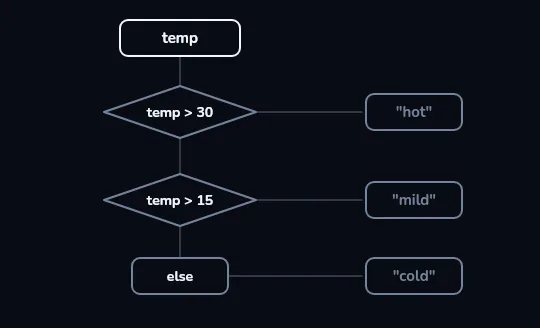
Two tests and an else, checked from the top The flow chart starts at a temp box, then two test diamonds,
temp > 30andtemp > 15, and an else box at the bottom. Each has a side exit to what it prints: "hot", "mild" or "cold". Nothing is lit yet: the program checks the tests from top to bottom.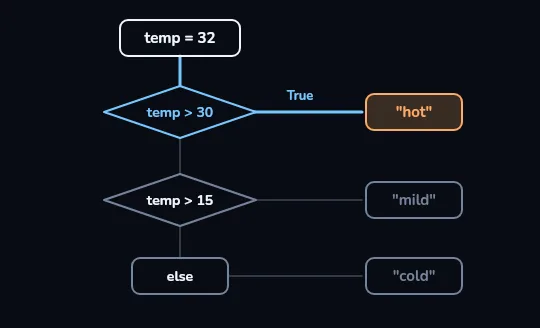
temp = 32: the first test is True With temp = 32, the first diamond lights up and its exit, marked True, runs straight across to "hot". The second test and else stay dim: once one branch runs, Python skips the others.
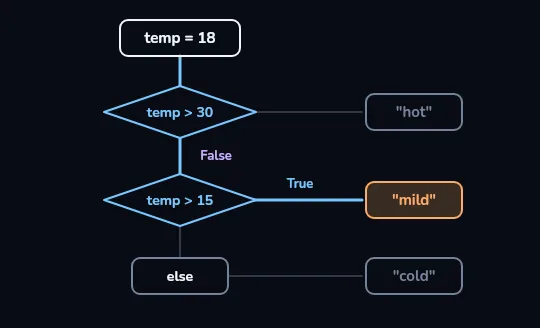
temp = 18: False, then True With temp = 18, the first test is False, so the path drops down to the second diamond.
temp > 15is True, and the path turns right to "mild". A False test simply sends Python on to the next one.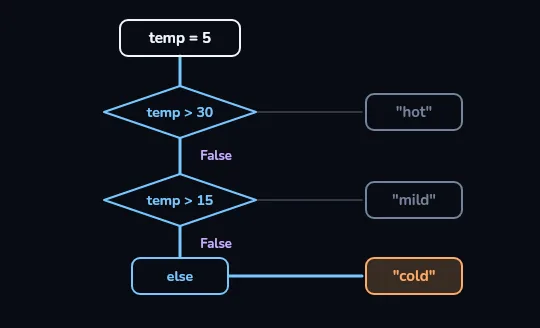
temp = 5: both False, so else runs With temp = 5, both diamonds say False and the path falls all the way down to else, which lights up "cold". else has no test of its own: it catches every value that no test above it matched.
Check yourself
If both the if test and an elif test are True, both of their blocks run.
Show the answer
False
False. Python runs only the first branch whose test is True and skips everything else in that if/elif/else chain. With temp = 32, both temp > 30 and temp > 15 are True, but only hot is printed.
ORDER MATTERS
Put the strictest test first
Because only the first True branch runs, the order of your tests changes the answer. A score of 95 is also at least 50, so if score >= 50 comes first, 95 gets "pass" and never reaches the "excellent" test. Put the narrowest test at the top and work down to the widest. To combine conditions, use and (both must be True), or (at least one) and not (flips True and False), as in age >= 18 and has_ticket.
Testing score >= 90 first, then score >= 50, gives 95 "excellent" and 60 "pass".
Check yourself
score = 95if score >= 50:print("pass")elif score >= 90:print("excellent")
Show the answer
The bug is on line 2.
Found it. The program runs without an error but prints pass, because 95 >= 50 is True and the first True branch wins. Swap the tests so score >= 90 is checked first.
age = 20
has_ticket = True
if age >= 18 and has_ticket:
    print("come in")
answer = "Yes"
if answer.lower() == "yes":
print("ok")come in
okThe first if needs both conditions, and both are True. The second shows a habit worth having: text comparisons are exact, so lower() turns Yes into yes before comparing, and the test works whether the user typed Yes, YES or yes.
Check yourself
Omid writes age = input("Age? "), types 20, and the next line is if age > 17:. What happens?
- The if runs, because 20 is more than 17
- The if is skipped, because "20" is text
- The program stops with a TypeError
- Python converts "20" to a number by itself
Show the answer
The program stops with a TypeError
Right. age holds the text "20", and Python won't compare text with a number using >. Writing age = int(input("Age? ")) fixes it.
Lesson recap
- Comparisons (==, !=, <, >, <=, >=) give True or False; = stores, == compares.
if test:runs its indented lines (4 spaces) only when the test is True; the colon is required.- Python checks if, then each elif, top to bottom, runs only the first True branch, and else catches the rest.
- Order matters: put the strictest test first, or 95 gets "pass" before it can reach "excellent".
- Combine tests with and, or and not; compare text exactly (use lower()), and convert input() before comparing it with a number.