
Reading error messages
An error message is Python telling you where it stopped and why. Read a traceback from the bottom up, recognise the six errors beginners meet most, and catch one you expect with try and except.
ANATOMY OF A TRACEBACK
Read the last line first
When a program crashes, Python prints a traceback. It starts with Traceback (most recent call last):, then lists each call it was in the middle of, as File "...", line N, with the failing line of code under it. The last line is the important one: the error's type and a message, like TypeError: can only concatenate str (not "int") to str. Read that first to learn what went wrong, then the line number just above it to learn where.
If a function called another function, you'll see one File line per call, like the frames on the call stack from the last lesson. The bottom one is where it actually broke.
name = "Sara"
age = 30
print(name + " is " + age)Traceback (most recent call last):
File "/home/sara/app.py", line 3, in <module>
print(name + " is " + age)
~~~~~~~~~~~~~~^~~~~
TypeError: can only concatenate str (not "int") to strThis is Python 3.11 running a file saved as /home/sara/app.py; your File line shows wherever your own file is. Python 3.10 and older don't draw the ~ and ^ line under the code, but the rest is the same. Last line: what (text plus a number). Line 3: where.
Check yourself
Negar's program crashes and prints a ten-line traceback. Which part should she read first?
- The first line, Traceback (most recent call last):
- The last line, with the error type and message
- The longest line
- None of it; she should rewrite the program from scratch
Show the answer
The last line, with the error type and message
Right. The last line says what went wrong, for example TypeError and why. The File ... line N just above it says where.
Step through it
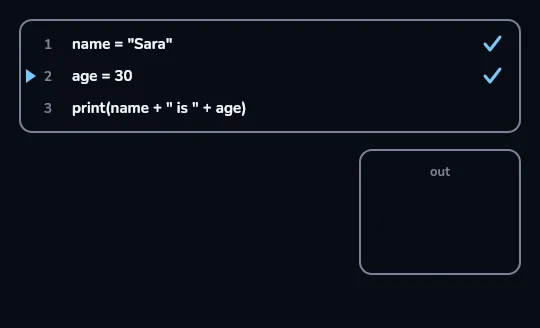
Lines 1 and 2 run fine The three-line program with its line numbers. The run arrow has passed line 1 and sits at line 2, and both have a tick: storing "Sara" and 30 works. Line 3 hasn't run yet, so the out panel is still empty.
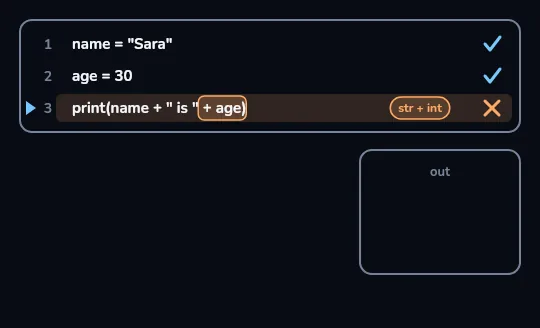
Line 3 fails at + age: str + int The arrow reaches line 3, which is marked with a cross. The part + age is outlined, with a str + int tag beside it: Python is joining the text "Sara is " to the number 30, which + can't do, so it stops right here and nothing is printed.
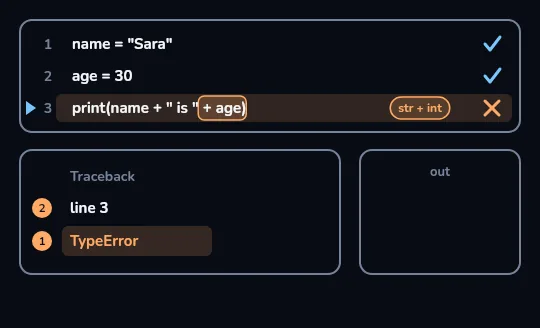
The traceback: read 1, then 2 A traceback card appears with three rows: Traceback, line 3 and TypeError. The numbered markers give the reading order: 1 is on the highlighted last row, TypeError, which says what went wrong, and 2 is on line 3, which says where.
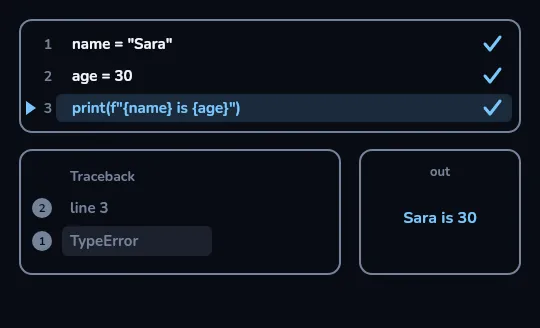
Fixed line 3 prints Sara is 30 Line 3 is rewritten as print(f"{name} is {age}"), an f-string, which turns age into text for you. All three lines now have a tick, the out panel shows Sara is 30, and the old traceback card fades. One line changed, then the program was run again.
Check yourself
Omid runs a two-line program: print("start"), then print(10 / 0). What does he see?
- Only an error; nothing runs because the file has a mistake in it
- start, then a traceback ending in ZeroDivisionError: division by zero
- start, then 0
- start, and nothing else
Show the answer
start, then a traceback ending in ZeroDivisionError: division by zero
Right. Dividing by zero is a runtime error: Python only finds it when it reaches line 2, so line 1 has already printed start.
Two kinds of error
Syntax error: before anything runs
The code isn't valid Python: a missing colon, bracket or quote, or = in an if. Python checks the whole file first, finds it, and runs nothing, not even the lines above it.
Names: SyntaxError, and IndentationError for indents that don't line up.
Runtime error: while running
The code is valid, but one step can't be done with these values: dividing by zero, a key that isn't there, text plus a number.
Every line before it has already run, so you may see some output first.
print("hi")
x = 5
if x > 3
print("big") File "/home/sara/app.py", line 3
if x > 3
^
SyntaxError: expected ':'A syntax error: no Traceback header, and hi is never printed, even though line 1 is fine, because Python refused to start. The ^ points at where the colon is missing. (Output from Python 3.11; older versions may word it as invalid syntax.)
The six you'll meet most
- NameError: name 'totl' is not defined: a typo, or a name used before it was given a value.
- TypeError: can only concatenate str (not "int") to str: mixing types; use an f-string or str().
- ValueError: invalid literal for int() with base 10: 'abc': the right type, but a value int() can't convert.
- IndexError: list index out of range: a position past the end; the last one is len - 1.
- KeyError: 'coffee': a dictionary key that isn't there; check with in, or use get.
- ZeroDivisionError: division by zero: dividing by 0, often a count that turned out empty.
Check yourself
Match each error to its usual cause
Show the answer
- NameError → A name that doesn't exist, often a typo
- TypeError → The wrong type for the operation, like text + number
- IndexError → A position past the end of a list
- KeyError → A key that isn't in the dictionary
Check yourself
total = 10bonus = 5print(totl + bonus)
Show the answer
The bug is on line 3.
Right. totl is a typo for total. Python stops with NameError: name 'totl' is not defined, and recent versions even add Did you mean: 'total'?
TRY AND EXCEPT
Catch an error you expect
Some errors aren't bugs; they're things users do. If someone types abc when asked their age, int(...) raises a ValueError. Put the risky lines under try: and what to do instead under except ValueError:. If the try block works, the except block is skipped; if a ValueError happens, Python jumps to except instead of crashing. Name the specific error you expect, so real bugs still show up.
In a real program the text would come from age = int(input("Age? ")). Below it's a plain variable so the output is fixed.
text = "abc"
try:
    age = int(text)
    print("Next year:", age + 1)
except ValueError:
print("Please type a number")Please type a numberint("abc") fails on the first line of the try block, so the print under it never runs and Python goes straight to the except block. No traceback, and the program keeps going.
Check yourself
text = "29"
try:
    age = int(text)
    print("Next year:", age + 1)
except ValueError:
    print("Please type a number")
Next year: 30Please type a numberNext year: 30 Please type a numberNext year: 291
Show the answer
Next year: 30Right. int("29") works, so the whole try block runs and the except block is skipped.
A debugging habit
- Read the last line
The error type and message tell you what kind of problem to look for.
- Go to the line number
Look at that line, and the one above it if it's a syntax error.
- Print the values involved
Add print(type(x), x) just before the failing line to see what you really have, not what you assumed.
- Change one thing and run again
One change at a time tells you which change fixed it. Stuck? Search the exact last line of the message; someone has usually explained it.
Lesson recap
- A traceback ends with ErrorType: message; read that last line first, then the line number above it.
- Syntax errors stop the program before anything runs; runtime errors happen mid-run, after earlier lines have printed.
- The common six: NameError, TypeError, ValueError, IndexError, KeyError, ZeroDivisionError.
- The reported line is where Python noticed the problem; with syntax errors, check the line above too.
- try / except SomeError handles an error you expect, like a user typing abc for a number.