
Saving and reading files
Variables disappear when the program ends; files stay. Open a file with with, write lines to it, add to it without wiping it, and read it back line by line.
OPEN, WITH, WRITE
Open a file, write to it, and let with close it
with open("notes.txt", "w") as f: opens notes.txt for writing and calls the open file f. Inside the indented block, f.write("milk\n") writes text into it. When the block ends, with closes the file for you, even if an error happened inside. Two things about write: it doesn't add a new line, so you put \n (the new-line character) at the end yourself, and it only takes strings, so a number needs str(12).
The file is looked for in the folder your program runs from, unless you give a full path like /home/reza/notes.txt.
with open("notes.txt", "w") as f:
    f.write("milk\n")
    f.write("eggs\n")

with open("notes.txt") as f:
print(f.read())milk
eggs
f.read() gives the whole file as one string, "milk\neggs\n". The empty last line of output is real: the file ends with \n, and print adds one more of its own. With no mode given, open reads.
Check yourself
f.write("tea") adds a new line after tea automatically, just like print does.
Show the answer
False
False. write puts exactly the text you give it into the file, nothing more. Write f.write("tea\n") if you want the next thing to start on a new line.
"w" wipes, "a" adds
"w" write
Creates the file if it's missing. If it already exists, erases everything in it first, then writes.
Use it to start a file fresh.
"a" append
Creates the file if it's missing. If it exists, keeps what's there and adds to the end.
Use it for logs, diaries and lists that grow. The third mode, "r", only reads, and is the default.
Check yourself
notes.txt has 3 lines. Mina opens it with open("notes.txt", "w") and writes one line. How many lines does the file have now?
- 1
- 3
- 4
- 0, because w can't write to an existing file
Show the answer
1
Right. "w" erased the three old lines the moment the file was opened, so only the new line is left.
Step through it
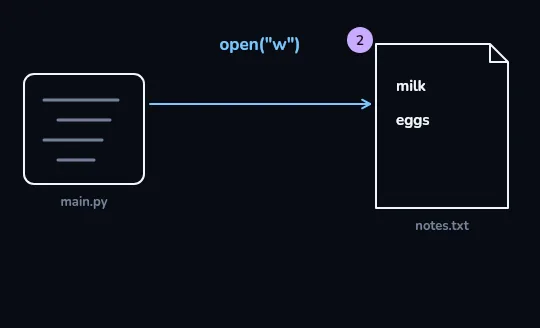
open("w"): main.py writes milk and eggs An arrow runs from the program, main.py, into notes.txt, labelled open("w"). Write mode starts the file empty and writes what it's given, so the document now holds two lines, milk and eggs, and its badge reads 2.
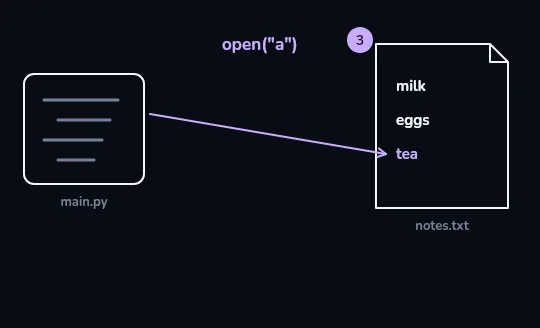
open("a"): tea is added at the end This time the arrow is labelled open("a") and points below the last line. Append mode keeps milk and eggs where they are and adds tea at the end, so the badge goes up to 3.
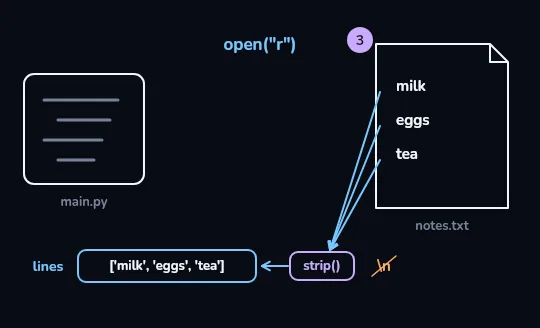
open("r"): the lines come back through strip() With open("r"), arrows run from each of the three lines in notes.txt into a strip() gate, which drops the \n at the end of each one. What comes out fills the list lines: ['milk', 'eggs', 'tea']. Reading doesn't change the file; the badge still says 3.
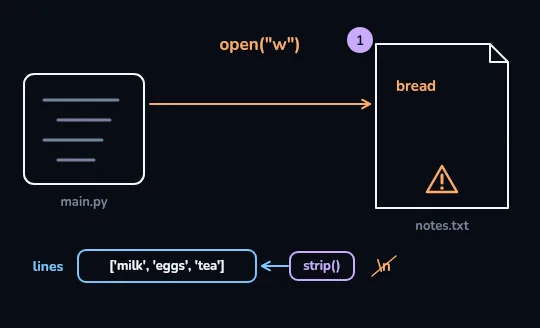
open("w") again: only bread is left The program opens notes.txt with "w" once more, drawn in warning orange, and writes bread. The three lines are wiped first, so the file holds only bread, the badge drops to 1 and a warning mark sits on the document. The list read in the step before still holds its copy, but the file itself has lost milk, eggs and tea.
Check yourself
# notes.txt holds: milk, eggs
with open("notes.txt") as f:
    for line in f:
        print(line.strip().upper())
MILK EGGSMILK EGGSMILKMILK EGGS
Show the answer
MILK
EGGSRight. The loop gives one line at a time, strip() removes its \n, and upper() capitalises it.
with open("notes.txt", "w") as f:
    f.write("milk\neggs\n")
with open("notes.txt", "a") as f:
    f.write("tea\n")

lines = []
with open("notes.txt") as f:
    for line in f:
        lines.append(line.strip())
print(lines)['milk', 'eggs', 'tea']The whole animation in one program: write two lines with "w", add a third with "a", then read them back into a list. Without strip() the list would be ['milk\n', 'eggs\n', 'tea\n'].
Check yourself
Match each piece to what it does
Show the answer
- "r" → Reads the file; the default
- "w" → Creates the file, or erases it and starts over
- "a" → Adds to the end, keeping what's there
- with → Closes the file for you when the block ends
Lesson recap
- Variables vanish when the program ends; a file on disk keeps data between runs.
- with open(name, mode) as f: opens the file and closes it for you at the end of the block.
- "r" reads (the default), "w" erases and writes, "a" adds to the end; "w" by mistake is how data gets lost.
- write adds no new line and takes only strings; put \n at the end yourself.
- for line in f gives lines ending in \n, so use line.strip(); add encoding="utf-8" for Persian text.