
Aperture: how wide the lens opens
The aperture is the adjustable hole in the lens. Learn why a smaller f-number means a bigger opening, how each full f-stop halves the light, and how the opening also changes how blurred the background is.
INSIDE THE LENS
An opening you can widen and narrow
Inside a camera lens, a ring of thin overlapping blades, the iris, forms a roughly round opening. Turn it one way and the blades pull back, letting more light through; turn it the other and they close in. It's the same thing the pupil of your eye does: wide in a dark room, a small dot in bright sun.
Walk from a sunny street into a dim café and your pupils widen within seconds to let more light in. A lens opened wide does the same for the sensor.
f-number
How the aperture is written: f/2, f/4, f/8 and so on. It's the lens's focal length divided by the opening's diameter, so it works like a fraction: a smaller number means a bigger opening and more light. f/2 is wide open; f/16 is close to a pinhole. This backwards feeling trips up almost every beginner, so say it once more: small number, big hole.
f/2 is like 1/2 of a pizza, f/16 like 1/16 of it. The bigger number is the smaller slice, and the smaller opening.
Check yourself
f/16 is a bigger opening than f/2, because 16 is the bigger number.
Show the answer
False
False. The f-number works like a fraction, so the bigger number is the smaller opening. f/2 is wide and lets in lots of light; f/16 is a tiny hole.
THE FULL STOPS
Each step halves the light
The numbers you'll see marked on lenses and in settings are the full stops: f/1.4, 2, 2.8, 4, 5.6, 8, 11, 16, 22. Each step to the right halves the light. The numbers grow by about ×1.4 each time, the square root of 2, rather than doubling, because the light depends on the opening's area, and area grows with the square of the width. A handy shortcut: every second number doubles (2, 4, 8, 16), and that's two stops.
f/2 to f/4 is two steps along the series, 2 → 2.8 → 4, so two stops: a quarter of the light.
Check yourself
Mina's photo at f/4 is correctly exposed. She changes only the aperture, to f/5.6. What happens to the light reaching the sensor?
- It doubles, because 5.6 is a bigger number
- It stays the same; the aperture only affects blur
- It halves: f/5.6 is one full stop smaller
- It drops to about 70 percent, because 4 divided by 5.6 is about 0.7
Show the answer
It halves: f/5.6 is one full stop smaller
Right. f/4 to f/5.6 is one step along the full-stop series, so half the light. Unless she changes something else, the photo comes out one stop darker.
Step through it
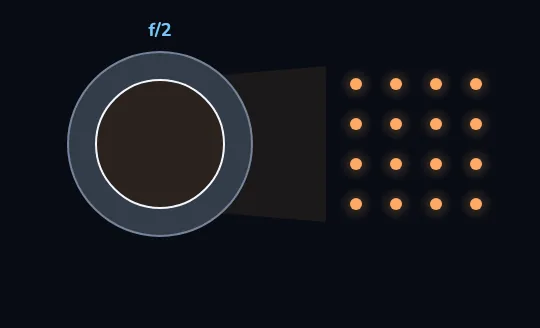
f/2: a wide opening The dark circle inside the grey ring is the aperture, set here to f/2. The opening is wide, so plenty of light gets through: the 16 dots on the right stand for the light that reaches the sensor.
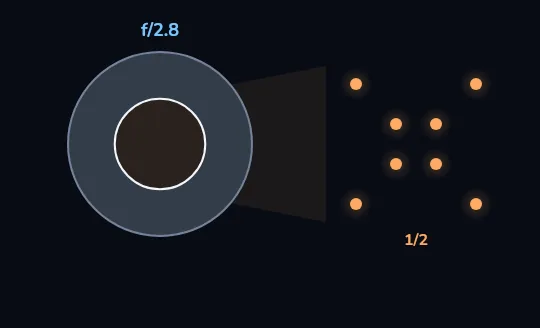
f/2.8: one stop smaller, half the light Close the aperture one stop, to f/2.8. The number went up, but the opening shrank to half its area, so only 8 dots get through now: half the light, marked 1/2.
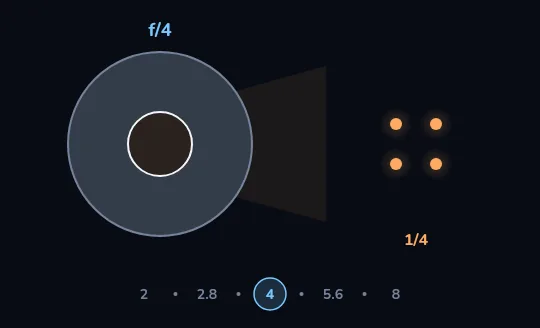
f/4: a quarter of the light One more stop, to f/4, and the opening shrinks again: 4 dots, a quarter of the light that got through at f/2. The ruler along the bottom shows the full stops 2, 2.8, 4, 5.6 and 8 with 4 ringed; every step to the right halves the light again.
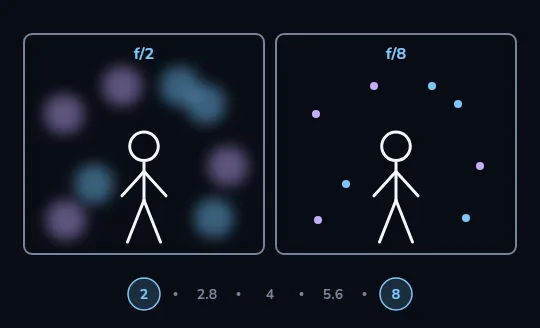
The opening also sets the background The same figure photographed twice. At f/2, ringed at the left end of the ruler, the figure is sharp and the lights behind it melt into big, soft circles. At f/8, four stops narrower, the figure is just as sharp, but the background stays small, crisp dots.
Check yourself
Using the ruler you just watched, which lets in more light, f/2 or f/8, and by how much?
- f/8, four times as much, because 8 is four times 2
- f/2, 16 times as much: four stops, each doubling the light
- f/2, four times as much, because 8 divided by 2 is 4
- They let in the same light; only the background changes
Show the answer
f/2, 16 times as much: four stops, each doubling the light
Right. f/2 → 2.8 → 4 → 5.6 → 8 is four stops, and each stop is a doubling: 2 × 2 × 2 × 2 = 16 times the light at f/2.
Wide open or stopped down
Wide: about f/1.8 to f/2.8
More light, and only a thin slice of the scene is sharp. The background melts into blur, which pulls the eye to your subject.
Good for: portraits, a single flower, a plate of food, dim rooms.
Narrow: about f/8 to f/11
Less light, and much more of the scene is sharp from front to back. The background stays readable.
Good for: landscapes, city views, group photos, anything where the setting matters as much as the subject.
Check yourself
Reza is on a hill and wants everything sharp, from the rocks at his feet to the peaks on the horizon. Which aperture should he pick on his camera?
- f/1.8, to let in as much light as possible
- f/2.8, the same as for a portrait
- Around f/8 to f/11, so much more of the scene is sharp front to back
- f/22, the smallest opening, because smaller always means sharper
Show the answer
Around f/8 to f/11, so much more of the scene is sharp front to back
Right. A narrow aperture around f/8 to f/11 keeps a deep zone sharp, and it avoids the slight softening that the very smallest openings bring.
PHONE OR CAMERA
Who controls the aperture
Camera: put it in A (Nikon, Sony, Fujifilm) or Av (Canon) mode, aperture priority. You choose the aperture, the camera chooses the shutter speed to keep the exposure right. It's a good everyday mode. Phone: most phone lenses have a fixed aperture, often somewhere around f/1.5 to f/2.2 on the main lens, so there's nothing to turn. The phone controls brightness with shutter speed and ISO instead. A few phones do have a switchable aperture. Because a phone's sensor is so small, its pictures are sharp almost front to back anyway, which is why Portrait mode fakes the blurred background in software.
Open Pro mode on a typical Android phone and you'll find ISO, S (shutter) and focus, with the f-number shown but greyed out.
Check yourself
Nima opens Pro mode on his phone to try f/8 for a landscape, but he can't change the f-number. Why?
- His phone's lens has a fixed aperture, so it adjusts shutter speed and ISO instead
- Pro mode hides the aperture until you pay for an upgrade
- Apertures only work in Portrait mode
- f/8 is too small a number for a phone
Show the answer
His phone's lens has a fixed aperture, so it adjusts shutter speed and ISO instead
Right. Most phone lenses have one fixed opening. The good news for his landscape: with a phone's small sensor, the view is sharp almost front to back anyway.
Lesson recap
- The aperture is an adjustable opening in the lens, like the pupil of your eye.
- Smaller f-number, bigger opening, more light: f/2 is wide, f/16 is tiny.
- Full stops are f/1.4, 2, 2.8, 4, 5.6, 8, 11, 16, 22, and each step to the right halves the light.
- Wide apertures (about f/1.8 to f/2.8) blur the background; narrow ones (about f/8 to f/11) keep more sharp.
- On a camera, A or Av mode lets you pick the aperture. Most phones have a fixed aperture and fake background blur with Portrait mode.