
Colour and white balance
Light has a colour, from candle orange to shade blue, and your eyes hide it while the camera doesn't. Learn colour temperature in kelvin, what white balance fixes, and when to let the warmth stay.
LIGHT HAS A COLOUR
Colour temperature, in kelvin
Different light sources give off different colours. Photographers measure this as colour temperature in kelvin (K): lower numbers are warmer, more orange; higher numbers are cooler, more blue. Approximate values: a candle about 1900 K; a warm household bulb about 2700 to 3000 K; midday sun about 5000 to 5500 K; an overcast sky about 6500 K; open shade under a blue sky about 7000 to 8000 K or more. The names feel backwards, since "warm" light has the lower number, but you'll get used to it.
The same room lit by a warm bulb at night and by window light at noon has two different colours of light, roughly 2700 K and 5500 K.
Check yourself
Which of these light sources is the warmest, the most orange?
- An overcast sky, about 6500 K
- Midday sun, about 5500 K
- Open shade under a blue sky, about 7500 K
- A candle, about 1900 K
Show the answer
A candle, about 1900 K
Right. The lower the kelvin number, the warmer and more orange the light, and a candle is the lowest here by far.
YOUR EYES CHEAT
White balance tells the camera what white is
Your brain adjusts so a white page looks white under a lamp or in shade; that's called colour constancy. The camera doesn't do this on its own. White balance (WB) is its correction, so that white things come out white. Auto WB gets it right most of the time. There are also presets: Daylight, Cloudy, Shade, Tungsten (also called Incandescent), Fluorescent, and a kelvin setting. On a camera you can set a custom WB from a photo of a white or grey card. On a phone, use auto, or the WB or K slider in Pro mode; most editing apps have Temperature and Tint sliders.
Under kitchen bulbs, Mina's Auto WB leaves the white plates a little yellow. Switching to the Tungsten preset makes them white.
Check yourself
Reza's photos of a white wall under warm indoor bulbs come out orange with WB set to Daylight. Which setting fixes it?
- Shade, about 7500 K
- Cloudy, about 6500 K
- Tungsten, about 2700 to 3000 K, or Auto
- Leave Daylight on and raise the ISO
Show the answer
Tungsten, about 2700 to 3000 K, or Auto
Right. Telling the camera the light is a warm bulb, around 2700 to 3000 K, makes it add the blue that cancels the orange. Auto would usually get close too.
Step through it
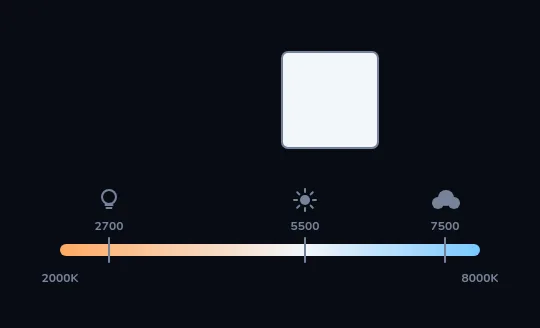
Light has a colour A colour temperature scale runs from 2000K at the orange end to 8000K at the blue end, with a bulb marked at 2700, the sun at 5500 and a cloud at 7500. Lower kelvin is warmer and more orange; higher is cooler and bluer. Above the scale sits a plain white card.
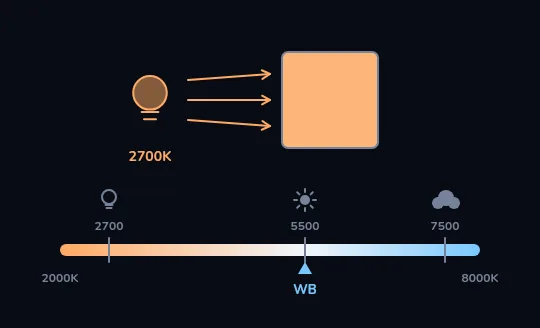
Warm bulb, daylight setting: an orange card A household bulb of about 2700K now lights the card, while the camera's white balance, the WB pointer, sits at 5500, the setting for daylight. The camera doesn't correct for the bulb's warmth, so the white card comes out strongly orange.
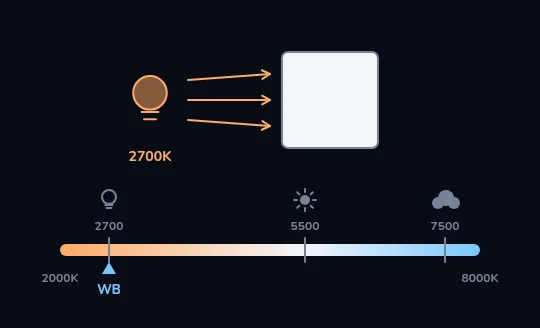
Tell the camera it's a bulb: white again Slide the WB pointer down to 2700 to match the bulb. The camera now adds just enough blue to cancel the orange, and the card comes out white again.
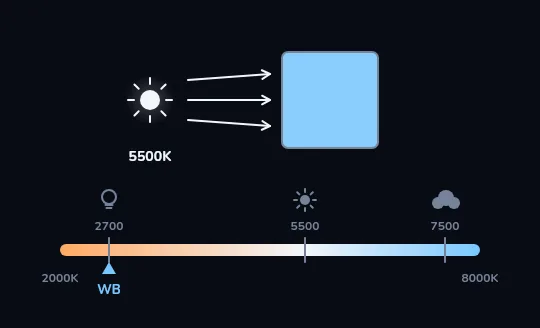
Sunlight with the bulb setting: a blue card Now the light is the sun, about 5500K, but the WB pointer has been left at 2700. The camera keeps adding the blue meant to cancel a bulb's orange, and there's no orange left to cancel, so the white card turns blue.
Check yourself
Sara sets WB to Tungsten for dinner at a restaurant, forgets about it, and walks outside at noon to photograph the street. How will those photos look?
- Blue, because the camera keeps adding blue meant to cancel warm bulb light
- Orange, because Tungsten is a warm setting
- Normal, because white balance only matters indoors
- Darker, because Tungsten lowers the exposure
Show the answer
Blue, because the camera keeps adding blue meant to cancel warm bulb light
Right. Just like the last frame: a 2700 K setting in 5500 K sunlight adds blue that nothing needs, so the street comes out cold and blue.
THE LOGIC THAT TRIPS PEOPLE UP
The setting names the light, not the look
The kelvin number you set is the light you're telling the camera you're under, not the colour you want. Set 2700 K and the camera assumes orange light and adds blue. Set a high number like 7500 K and it assumes blue light and adds orange, so in warm light the picture turns even more orange. White balance also has a second axis, Tint, running from green to magenta: some fluorescent and LED lights add a green cast that Tint fixes.
An office lit by old fluorescent tubes makes faces look slightly sickly green. Nudging Tint towards magenta brings the skin back.
Check yourself
Under warm bulb light, setting the white balance to a high number such as 7500 K makes the photo look even more orange.
Show the answer
True
True. A high kelvin setting tells the camera the light is blue, so it adds orange to compensate. Add that to light that was already orange, and the picture gets warmer still.
WHITE BALANCE AS A CHOICE
Sometimes the warmth is the point
Auto WB tries to make everything neutral, and sometimes that's the last thing you want. It can "correct" the orange glow of a golden-hour sunset or a candle-lit dinner into something flat and grey. To keep the mood, set Daylight or Cloudy instead of Auto, or warm the picture up in editing. Mixed light, like a warm lamp on one side of a face and blue window light on the other, can't be fully fixed with one setting: pick the source that lights the face, or turn one of them off.
Nima's photo of a candle-lit birthday cake looks cold on Auto. On Daylight WB, the candle glow comes back and the faces around it look warm and happy.
Check yourself
Mina is photographing a deep orange sunset. Why might she switch off Auto WB?
- Auto WB makes photos darker at sunset
- Auto WB may neutralise the warm orange she actually wants to keep
- Auto WB only works with the flash on
- Auto WB turns everything green outdoors
Show the answer
Auto WB may neutralise the warm orange she actually wants to keep
Right. Auto WB treats the orange as a colour cast to remove. Setting Daylight or Cloudy keeps the sunset looking the way it felt.
Check yourself
- Reza shoots a party in RAW on his camera. Later he drags the Temperature slider all the way from orange to neutral, and the faces look clean and natural.
- Nima shoots the same party as ordinary JPEGs. He drags the same slider just as far, and the faces turn blotchy and oddly coloured.
What explains the different results?
- Reza's editing app is better
- RAW keeps the sensor's data so WB can be changed later without loss; a JPEG has the white balance baked in
- JPEG files can't be edited at all
- Nima should have used a higher ISO
Show the answer
RAW keeps the sensor's data so WB can be changed later without loss; a JPEG has the white balance baked in
Exactly. A RAW file stores what the sensor recorded, and white balance is just an instruction applied on top. A JPEG or HEIC already has the colours fixed in, so you can still adjust it, but big changes start to break down.
Colour in your composition
- Warm colours, reds, oranges and yellows, tend to feel near and energetic.
- Cool colours, blues and greens, tend to feel calm and distant.
- One bold colour against a muted background pulls the eye straight to it: a red coat in a grey street.
- RAW (on cameras, and ProRAW or RAW on some phones) keeps white balance fully adjustable later; JPEG and HEIC bake it in.
Lesson recap
- Light has a colour temperature in kelvin: lower is warmer and more orange, higher is cooler and bluer.
- Roughly: candle 1900 K, household bulb 2700 to 3000 K, midday sun 5000 to 5500 K, overcast 6500 K, shade 7000 K and up.
- White balance is the camera's correction so white looks white; Auto works most of the time.
- The setting names the light you're under: a bulb setting in sunlight turns everything blue.
- Keep the warmth of a sunset or candlelight on purpose, and shoot RAW when you want freedom to fix colour later.